How Augmented and Virtual Reality Technology Works Using Displays, Sensors, Tracking and Spatial Computing
Augmented reality and virtual reality can make digital information feel surprisingly physical. A virtual reality headset can place a person inside an entirely computer-generated environment, while an augmented reality device can add digital objects, instructions or information to the world around them.
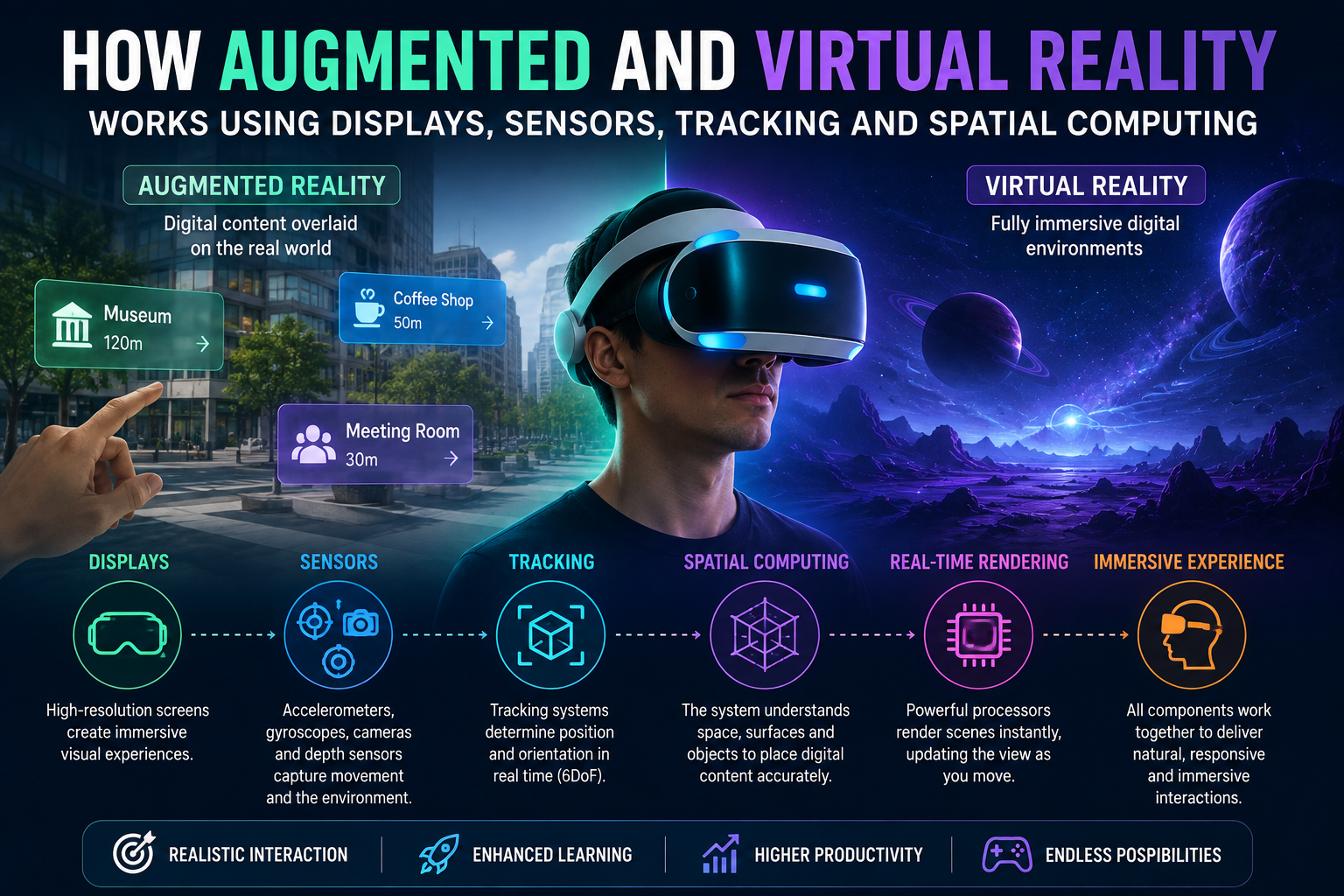
Although the experiences can look effortless, a great deal of technology works behind the scenes. Displays create the visual experience, sensors measure movement, tracking systems determine where the user and device are located, and spatial computing helps software understand the relationship between digital content and the physical environment.
Understanding how these components work together explains why modern AR and VR systems can respond to head movements, recognize surfaces and create increasingly convincing interactive experiences. For a deeper look specifically at virtual environments and immersive experiences, see Virtual Reality Explained.
What Are Augmented and Virtual Reality?
Virtual reality (VR) replaces much of the user’s visual environment with a computer-generated one.
A VR headset typically covers the user’s field of view and displays separate images to the left and right eyes. The difference between those images creates the perception of depth.
Augmented reality (AR) works differently. Instead of completely replacing the physical environment, AR adds digital information to it.
For example, an AR system might display:
- Navigation directions
- Digital labels
- 3D objects
- Instructions
- Notifications
- Educational information
- Product visualizations
There is also mixed reality (MR), where digital objects can appear to interact more extensively with the physical environment. A virtual object might appear to sit on a real table, disappear behind a real wall or remain anchored to a particular location.
These technologies overlap, but they create different relationships between digital and physical environments.
How AR and VR Systems Create Immersive Experiences
At a basic level, an immersive system has to solve several problems simultaneously.
It needs to:
- Display images to the user.
- Detect how the user is moving.
- Determine the position and orientation of the device.
- Update the digital scene accordingly.
- Render new images quickly enough to maintain a convincing experience.
Consider someone wearing a VR headset and turning their head to the right.
The system needs to detect that movement, calculate the new orientation and render the appropriate portion of the virtual environment.
This process happens continuously.
User movement
↓
Sensors detect movement
↓
Tracking system estimates position
↓
Software updates virtual scene
↓
Graphics processor renders new view
↓
Display shows updated image
↓
User sees the scene respond
The faster and more accurately this loop operates, the more natural the experience can feel.
Displays Are the Foundation of Visual Reality
The displays inside AR and VR devices are responsible for presenting digital images to the user’s eyes.
Modern headsets commonly use compact display technologies such as OLED, LCD or other advanced display architectures.
A VR headset generally uses separate visual information for each eye.
This creates stereoscopic vision, which helps the brain perceive depth.
Why Two Images Matter
Human vision naturally receives slightly different images from each eye because the eyes are separated by a small distance.
The brain combines these differences to estimate depth.
VR systems reproduce this principle by presenting slightly different perspectives to each eye.
Left eye → slightly different image
Right eye → slightly different image
↓
Brain combines them
↓
Perception of depth
This is one of the fundamental techniques that allows a flat display to create a three-dimensional visual experience.
Field of View Affects Immersion
Field of view, or FOV, describes how much of the visual environment a device can display.
A narrow field of view can make a digital environment feel more like looking through a window.
A wider field of view can create a stronger sense of immersion because more of the user’s peripheral vision is occupied by the digital scene.
However, increasing field of view can create additional technical challenges.
The system may need to render more of the scene, and optical components must deliver a clear image across a larger viewing area.
Refresh Rate Helps Make Movement Smooth
Displays also need to update rapidly.
The refresh rate describes how many times a display updates its image each second.
Higher refresh rates can make motion appear smoother and can reduce the visual sensation of flickering or discontinuity.
For interactive AR and VR applications, smooth motion is particularly important because users can move their heads rapidly.
A system that responds slowly can make the virtual environment feel disconnected from physical movement.
Resolution Determines Visual Detail
Resolution affects how much detail the user can see.
Higher-resolution displays can make text, objects and distant details appear clearer.
In VR, however, resolution is only one factor.
The quality of the optics, the field of view, pixel density and rendering technology also affect how sharp the image appears.
Some systems use techniques such as foveated rendering to allocate more rendering resources to the area where the user is looking.
This can reduce the amount of computational work required without necessarily making the reduction obvious to the user.
Sensors Tell the System How the Device Is Moving
Displays create the visual experience, but sensors provide the information needed to make that experience interactive.
AR and VR devices can contain several types of sensors.
Common examples include:
- Accelerometers
- Gyroscopes
- Cameras
- Depth sensors
- Magnetometers
- Proximity sensors
- Eye-tracking cameras
- Hand-tracking cameras
Each sensor provides different information.
The system combines their measurements to build a more complete understanding of movement and surroundings.
The same combination of sensors and software is increasingly important in other intelligent devices, including connected wearables. The Wearable Technology Guide explains how sensors, processors and connectivity allow wearable devices to interact with their users and surroundings.
Accelerometers Measure Changes in Motion
An accelerometer measures acceleration along one or more axes.
In a headset, this information can help determine how the device is moving.
For example, the accelerometer can detect changes associated with:
- Tilting
- Moving forward
- Moving backward
- Moving sideways
- Raising or lowering the device
Accelerometers alone are not sufficient for precise spatial tracking, but they provide valuable movement information.
Gyroscopes Measure Rotation
A gyroscope measures rotational movement.
This is particularly important when the user turns their head.
If someone rotates their head from left to right, the gyroscope detects the change in orientation.
Combining gyroscope information with accelerometer data allows the system to estimate how the headset is moving.
This process is commonly referred to as inertial sensing.
Cameras Help Devices Understand the Environment
Many modern AR and VR systems use cameras to observe the surrounding environment.
Cameras can help systems detect:
- Walls
- Floors
- Tables
- Furniture
- Objects
- Movement
- Visual features
- Human hands
This allows the software to build a representation of the physical environment.
For AR, this is particularly important because digital content needs to be positioned relative to real-world objects.
Depth Sensors Add Distance Information
A normal camera captures visual information, but determining the exact distance between the device and objects can be more difficult.
Depth sensors can provide additional information about distance.
Depending on the technology, depth sensing may use techniques involving infrared light, time-of-flight measurements or other methods.
The resulting information can help the system determine that:
- A wall is nearby.
- A table is several feet away.
- The floor is below the user.
- A physical object is blocking part of the environment.
This can make digital objects behave more naturally within physical spaces.
What Is Spatial Tracking?
Spatial tracking is the process of determining where a device or object is located and how it is oriented within an environment.
There are two important concepts:
Position
Where is the device?
For example:
The headset is approximately two meters from the wall.
Orientation
Which direction is the device facing?
For example:
The user is looking toward the right side of the room.
A complete tracking system needs to estimate both.
Six Degrees of Freedom
Modern VR and AR systems often track six degrees of freedom, commonly abbreviated as 6DoF.
These represent movement along three spatial axes and rotation around those axes.
The six movements are:
- Forward and backward
- Left and right
- Up and down
- Pitch
- Yaw
- Roll
This allows a headset to understand both where the user moves and how they rotate.
A simpler system might track only rotational movement.
That can allow a user to look around but does not necessarily allow them to physically move through a virtual environment with the same degree of positional accuracy.
Inside-Out and Outside-In Tracking
There are different ways AR and VR systems can track movement.
Inside-Out Tracking
Inside-out tracking uses sensors mounted on the headset or device itself.
Cameras and other sensors observe the environment and estimate the device’s position.
Advantages include:
- Less external equipment
- Easier setup
- Greater portability
- More flexible use
Outside-In Tracking
Outside-in tracking uses external sensors or cameras to observe the headset and controllers.
This approach can provide highly precise tracking in controlled environments, although it may require additional hardware.
Both approaches have advantages depending on the application.
How Spatial Mapping Works
AR systems often need to understand the shape of the surrounding environment.
This process is sometimes called spatial mapping.
The system collects information from cameras and depth sensors and uses it to create a digital representation of physical surfaces.
For example:
Physical room
↓
Cameras + depth sensors
↓
Environmental measurements
↓
Spatial map
↓
Digital objects positioned within the map
The system may identify a floor, walls, furniture and other surfaces.
This allows digital content to interact with the environment more realistically.
Why Digital Objects Can Appear Anchored
One of the most impressive features of modern AR is the ability to make digital objects appear fixed in a physical location.
Imagine placing a virtual lamp on a real table.
If you walk around the table, the lamp should remain in approximately the same position.
To achieve this, the system needs to continuously estimate:
- The device’s position
- The device’s orientation
- The location of the table
- The relationship between the digital object and the environment
The software can then repeatedly calculate where the virtual lamp should appear on the display.
Understanding SLAM
One important technology behind many AR and VR systems is simultaneous localization and mapping, commonly known as SLAM.
The basic idea is that the device attempts to determine:
- Where it is.
- What the surrounding environment looks like.
At the same time.
This creates an interesting problem.
The device needs a map to help determine its position, but it also needs to know its position to construct the map.
SLAM algorithms address this by continuously combining sensor observations and movement estimates.
They can identify visual features in the environment and use those features as reference points.
Why Tracking Accuracy Matters
Small tracking errors can become noticeable in immersive applications.
Suppose an AR application places a digital object on a real desk.
If the tracking system gradually loses accuracy, the object may appear to drift.
This is known as tracking drift.
Good tracking systems continuously update their environmental understanding to reduce these errors.
Accuracy is particularly important when digital content needs to remain aligned with real-world objects.
What Spatial Computing Adds
Spatial computing refers broadly to computing systems that understand and interact with the physical and three-dimensional world.
Instead of treating a computer screen as the primary environment, spatial computing allows software to work with:
- Physical spaces
- 3D objects
- Human movement
- Hand gestures
- Voice
- Eye position
- Environmental surfaces
This creates a more natural relationship between people and computers.
Rather than clicking a button on a flat screen, a user might manipulate a virtual object with their hands or look at an interface positioned in the room.
Hand Tracking Makes Interaction More Natural
Some AR and VR systems can track a user’s hands without requiring physical controllers.
Cameras observe the user’s hands and software identifies important points such as:
- Fingers
- Knuckles
- Palm
- Wrist
The system can then estimate hand gestures.
For example:
Pinch → select
Point → interact
Open palm → menu
This allows users to interact with virtual content using familiar physical movements.
Eye Tracking Adds Another Layer
Eye-tracking technology uses cameras or other sensors to estimate where the user is looking.
This can serve several purposes.
Interface Control
Users may select or highlight objects simply by looking at them.
Performance Optimization
The system can prioritize rendering resources around the user’s gaze.
User Research
Eye-tracking data can help researchers understand where people focus their attention.
Accessibility
Gaze-based interaction can provide an alternative input method for some users.
Eye tracking therefore has applications beyond visual immersion.
Audio Is Part of Immersion Too
AR and VR experiences are not based solely on visuals.
Spatial audio can make sounds appear to originate from particular locations.
For example, a virtual sound may appear to come from:
- Behind the user
- Above them
- To their left
- Inside a virtual room
As the user moves, the software can adjust the sound accordingly.
This helps create a more convincing sense of presence.
What Is Presence?
Presence describes the feeling that you are actually located within a digital environment rather than simply looking at a screen.
Several factors can contribute to this sensation:
- Visual realism
- Accurate tracking
- Low latency
- Spatial audio
- Depth perception
- Responsive interaction
- Consistent scale
- Natural movement
No single component creates presence on its own.
It is the result of many systems working together.
Why Latency Is So Important
Latency is the delay between a user’s movement and the system’s response.
In AR and VR, low latency is particularly important.
Imagine turning your head quickly but seeing the virtual environment update noticeably later.
That disconnect can make the experience feel unnatural.
High latency can also contribute to discomfort for some users.
For this reason, AR and VR systems are designed to process sensor data, tracking calculations and graphical rendering extremely quickly.
Rendering Turns Data Into Images
Once the system understands the user’s position and orientation, the graphics processor must generate the appropriate visual scene.
This process is called rendering.
The computer calculates how objects should appear from the user’s current viewpoint.
It considers factors such as:
- Object position
- Lighting
- Perspective
- Depth
- Materials
- Shadows
- Camera position
- Eye position
The resulting image is sent to the display.
Because the user’s position is constantly changing, the scene must be rendered repeatedly.
Why Graphics Processing Matters
AR and VR can require significant computing power because the system needs to render detailed three-dimensional environments while processing sensor information simultaneously.
Modern systems may use:
- CPUs
- GPUs
- Dedicated AI processors
- Image-processing hardware
- Sensor-processing systems
Some devices perform much of this work locally, while others can use external computers or cloud services for certain tasks.
Local processing is particularly important for latency-sensitive functions.
How AR Understands Real-World Objects
More advanced AR systems can recognize objects and surfaces.
Computer vision algorithms can analyze camera images to identify patterns and objects.
For example, software might distinguish between:
- A floor
- A wall
- A chair
- A person’s hand
- A table
- A doorway
This understanding allows applications to place digital information more intelligently.
An educational AR application could display information next to a physical object, while a design application might allow a virtual piece of furniture to appear inside a real room.
The Role of Artificial Intelligence
Artificial intelligence can enhance spatial computing by helping systems interpret complex visual and environmental information.
AI can contribute to:
- Object recognition
- Hand tracking
- Gesture recognition
- Scene understanding
- Voice recognition
- Image segmentation
- Natural-language interaction
This means future spatial systems can potentially understand not only where objects are, but also what those objects are and how users interact with them.
The same combination of perception, AI, sensors and physical interaction is central to modern robotics. The Complete Guide to Robotics and Consumer Robots provides a broader look at how intelligent machines use these technologies to interact with their environments.
AR and VR Need Multiple Systems Working Together
It is tempting to think of a headset as a single technology, but an immersive device is really a collection of interconnected systems.
A simplified architecture looks like this:
USER
↓
Movement + Input
↓
┌───────────────────┐ │ Sensors & Cameras │ └───────────────────┘
↓
Tracking Engine
↓
Spatial Understanding
↓
Application Software
↓
Graphics Rendering
↓
Display
↓
USER
The cycle repeats continuously.
Every component contributes to the final experience.
Where AR and VR Technology Is Used
These technologies are finding applications across many industries.
Education
Students can interact with three-dimensional models of:
- Human anatomy
- Historical environments
- Engineering systems
- Scientific structures
- Geographic locations
Healthcare
AR and VR can support areas such as:
- Medical education
- Surgical planning
- Rehabilitation
- Training simulations
Manufacturing
Workers can use spatial interfaces for:
- Equipment instructions
- Maintenance procedures
- Training
- Design visualization
Architecture and Design
Designers can visualize buildings and products at realistic scale before physical construction.
Retail
AR can allow customers to visualize products in their own environment before purchasing.
Entertainment
VR can create immersive games and experiences, while AR can add digital layers to physical environments.
Workplace Collaboration
Spatial technologies can support three-dimensional meetings, visualization and remote collaboration.
Challenges That AR and VR Still Face
Despite major advances, immersive technology has several challenges.
Battery Life
Portable devices need to balance computing power with energy consumption.
Weight
Headsets must contain displays, lenses, sensors, processors, batteries and other components while remaining comfortable.
Heat
Powerful processors generate heat, which must be managed in a device worn close to the user’s face.
Tracking Reliability
Tracking can become more difficult in environments with limited visual features or changing lighting.
Display Quality
Manufacturers continue working on higher resolution, wider fields of view and improved optical systems.
User Comfort
Long sessions can create fatigue or discomfort, making ergonomics an important part of device design.
Privacy
Cameras and sensors can collect information about people’s environments, movements and interactions, creating important privacy considerations.
AR vs. VR: How the Technologies Differ
| Feature | Augmented Reality | Virtual Reality |
|---|---|---|
| Physical world visible | Usually yes | Usually no |
| Digital environment | Added to reality | Replaces reality |
| Main purpose | Enhance physical surroundings | Create immersive virtual environments |
| Environmental tracking | Very important | Important |
| Typical interaction | Physical + digital | Primarily digital |
| Common applications | Navigation, visualization, assistance | Gaming, simulation, training |
Mixed reality systems can combine characteristics of both.
What the Future of Spatial Technology Could Look Like
The long-term development of AR and VR is likely to involve smaller devices, better displays, more accurate tracking and increasingly capable spatial software.
Several technologies could contribute to that evolution:
- Improved miniature displays
- Better optical systems
- More efficient processors
- Advanced computer vision
- AI-powered scene understanding
- More accurate hand and eye tracking
- Better spatial audio
- Improved battery technology
- Faster wireless connectivity
The ultimate goal is not simply to create better headsets. It is to make digital information interact with the physical world in ways that feel increasingly natural.
The evolution of spatial computing also connects closely with the development of intelligent machines that can perceive and act within physical environments. The Future of Robotics explores how increasingly capable robots are combining AI, sensors, perception and autonomous decision-making.
From Screens to Spatial Computing
AR and VR represent a shift in the way computers can present information. Instead of limiting digital content to a traditional monitor or smartphone screen, spatial computing allows software to understand position, movement, depth and physical surroundings.
Displays create the images. Sensors measure movement. Cameras and depth systems observe the environment. Tracking algorithms estimate position and orientation. Spatial mapping connects digital content with physical space. Graphics processors render the appropriate scene, while low-latency systems ensure that everything responds quickly enough to feel natural.
The technology is complex, but the principle is relatively simple: the computer continuously observes the user’s relationship with space and updates digital information to match it.
As those capabilities improve, augmented and virtual reality could become less about wearing a specialized device and more about changing how people interact with digital information in everyday environments.