How to Understand Product Features and Specifications
Shopping for a new product can quickly become confusing.
Manufacturers often fill product pages with technical terms, measurements, performance figures and feature lists designed to make their products stand out. For experienced buyers, these specifications can provide useful information. For everyone else, they can feel like a wall of numbers and unfamiliar terminology.
Understanding product features and specifications does not require being an expert. The key is knowing what the information actually means, which specifications matter for your particular needs and which impressive-sounding details may have little effect on your buying decision.
Whether you are comparing smartphones, laptops, televisions, appliances, cameras or other consumer products, learning how to read specifications can help you make more informed choices. A broader framework for evaluating those choices can be found in The Complete Guide to Choosing the Right Products.
What Are Product Features and Specifications?
Although the terms are sometimes used interchangeably, features and specifications describe different aspects of a product.
A feature generally describes something a product can do or a capability it provides.
For example, a smartphone might have:
- Wireless charging
- Face recognition
- Water resistance
- Multiple cameras
- Artificial intelligence tools
A specification provides a more measurable description of the product.
For example:
- Battery capacity: 5,000 mAh
- Display size: 6.7 inches
- Storage: 256 GB
- Weight: 190 grams
- Processor: Eight-core chip
Features explain what a product offers, while specifications often explain how the product is configured or what its capabilities are.
Both can be useful, but neither tells you automatically whether the product is right for you.
Start With What You Actually Need
One of the biggest mistakes shoppers make is starting with specifications instead of their needs.
A product can have excellent specifications and still be a poor choice for a particular buyer.
Before comparing products, identify what matters most to you.
Ask yourself:
- What will I primarily use this product for?
- How frequently will I use it?
- Which features are essential?
- Which features would simply be nice to have?
- Are there any limitations I need to avoid?
- How long do I expect to keep it?
- What is my realistic budget?
For example, someone buying a laptop primarily for web browsing and office work may not benefit much from paying significantly more for a high-end graphics processor.
On the other hand, someone editing professional video may consider graphics performance and memory extremely important.
The same specification can therefore have very different value depending on the buyer.
Learn the Difference Between Important and Impressive
Product specifications are often presented in ways that make certain numbers look especially impressive.
A higher number is not automatically better.
A television with a larger screen may be more enjoyable for some viewers, but it also takes up more space.
A camera with more megapixels may capture highly detailed images, but megapixel count alone does not determine overall image quality.
A laptop with a faster processor may perform better in demanding applications, but the difference may be difficult to notice during basic browsing.
A useful question is:
What does this specification actually change in everyday use?
If the answer is unclear, the specification may not deserve much weight in your decision.
Understand the Basic Specifications First
Most product categories have a group of specifications that appear repeatedly.
Learning these fundamentals makes comparison shopping much easier.
For example, when buying electronics, you may encounter:
- Size
- Weight
- Storage
- Memory
- Processor
- Battery capacity
- Display resolution
- Connectivity
- Power consumption
The specific terminology varies between product categories, but the principle is the same.
Do not attempt to understand every specification at once. Start with the handful that have the greatest effect on how you intend to use the product.
Product Size and Dimensions Matter
Dimensions are among the easiest specifications to overlook.
A product may look compact in an online photograph but be considerably larger than expected when it arrives.
Check:
- Height
- Width
- Depth
- Weight
- Required clearance
- Folded or extended dimensions
This is particularly important for appliances, furniture, monitors, televisions and other products that need to fit into a specific physical space.
For portable products, weight can also influence comfort.
A slightly heavier laptop, camera or tablet may not seem significant on paper, but the difference can become noticeable when carrying it for several hours.
Capacity Is Not Always the Same as Usable Capacity
Capacity specifications appear across many product categories.
Examples include:
- Storage capacity
- Battery capacity
- Washing-machine capacity
- Refrigerator capacity
- Water-tank capacity
- Paper capacity
A larger capacity can be useful, but the advertised figure may not represent exactly how much usable space you will have.
Storage devices, for example, may display less available capacity after formatting and system requirements are accounted for.
Similarly, an appliance’s stated capacity may not translate directly into the amount of material you typically want to place inside it.
Think about how the capacity translates into real-world use, not just the number printed on the product page.
Understanding Storage Specifications
Storage is particularly important when comparing computers, smartphones, cameras and other digital devices.
Storage is commonly measured in gigabytes (GB) or terabytes (TB).
More storage generally means more room for:
- Photos
- Videos
- Applications
- Games
- Documents
- Music
- Other files
But capacity is only one part of the equation.
The type of storage can also affect performance.
For computers, for example, solid-state drives (SSDs) are generally much faster and more responsive than traditional mechanical hard drives.
This illustrates an important buying principle: two products can have the same capacity while offering very different experiences.
RAM and Storage Are Different
Computer and smartphone specifications often list both memory and storage, which can confuse shoppers.
RAM is working memory used by a device while applications and processes are running.
Storage is where files, applications and other data are kept.
Increasing storage gives you more space for files.
Increasing RAM can help a device handle more simultaneous tasks, depending on the software and hardware.
A computer with a large storage drive does not necessarily have enough RAM for demanding workloads.
Understanding this distinction makes it easier to compare products accurately.
Processor Specifications Can Be Complicated
Processor specifications are among the easiest to misunderstand.
Manufacturers may advertise:
- Number of cores
- Clock speed
- Processor generation
- Architecture
- Cache
- Performance benchmarks
It is tempting to compare one number and assume the higher value represents a faster processor.
That can be misleading.
Processor performance depends on architecture, workload, efficiency, software optimization and many other factors.
For this reason, comparing the exact processor model and independent performance testing can be more useful than simply comparing clock speeds or core counts.
Display Specifications Tell Only Part of the Story
When shopping for televisions, monitors, smartphones and tablets, you will encounter display specifications such as:
- Screen size
- Resolution
- Refresh rate
- Brightness
- Contrast
- Panel technology
- Color coverage
Each describes a different characteristic.
Screen Size
This refers to the diagonal measurement of the display.
Resolution
Resolution describes the number of pixels used to create the image.
Refresh Rate
Refresh rate, measured in hertz (Hz), indicates how frequently the display can refresh the image.
Brightness
Brightness can affect visibility, particularly in environments with strong ambient light.
Panel Technology
Different display technologies can produce different characteristics in areas such as contrast, viewing angles, response time and color reproduction.
The important point is that no single display specification determines overall picture quality.
Battery Capacity Does Not Guarantee Battery Life
Smartphones, laptops, tablets and other portable electronics often advertise battery capacity.
For many devices, this is expressed in milliamp-hours (mAh) or watt-hours (Wh).
A larger battery can provide more energy capacity, but it does not automatically mean longer battery life.
Actual battery endurance depends on:
- Processor efficiency
- Display technology
- Screen brightness
- Software
- Network connectivity
- Background processes
- Application usage
- Battery health
Two devices with similar battery capacities can therefore have very different real-world battery life.
When battery performance matters, look for independent testing or manufacturer estimates under clearly defined conditions.
Cameras Are More Than Megapixels
Camera specifications provide another example of why shoppers should avoid focusing on one number.
A camera may advertise a very high megapixel count, but image quality depends on many other factors.
Important characteristics can include:
- Sensor size
- Lens quality
- Aperture
- Image stabilization
- Autofocus
- Image processing
- Low-light performance
- Dynamic range
- Video capabilities
A larger megapixel number can be useful for certain types of photography, but it does not automatically mean better images.
Sample photographs and independent reviews can provide information that a specification sheet cannot.
Water Resistance Has Specific Limits
Terms such as water-resistant or waterproof can be particularly misleading.
Many electronics have an IP rating, which describes resistance to dust and water under specified testing conditions.
The rating matters because different levels provide different forms of protection.
However, an IP rating does not mean a product is immune to every type of water exposure.
Conditions such as depth, duration, pressure, temperature and the condition of seals can matter.
If water resistance is important, read the manufacturer’s exact conditions rather than treating the word “waterproof” as an unlimited guarantee.
Connectivity Specifications Matter More Than They Seem
Modern products often include a long list of connectivity options.
These can include:
- Wi-Fi
- Bluetooth
- USB
- HDMI
- NFC
- Cellular connectivity
- Ethernet
- GPS
Compatibility can be more important than simply having a particular port or wireless standard.
For example, a laptop might have USB-C but not support every function through that port. A television may have HDMI connections but differ in the supported features of those inputs.
Check what each connection actually supports before assuming compatibility.
Compatibility Is a Critical Specification
A product can have excellent specifications and still be unsuitable if it does not work with your existing equipment or software.
Before purchasing, check compatibility with:
- Your operating system
- Existing accessories
- Chargers
- Cables
- Apps
- Smart-home systems
- Network equipment
- File formats
- Other devices
Compatibility problems can turn an apparently good deal into an expensive inconvenience.
Energy Efficiency Can Affect Long-Term Cost
For appliances and electronics that consume significant amounts of electricity, energy efficiency can be more important than the initial purchase price.
A product that costs less upfront but consumes considerably more electricity could become more expensive over its lifetime.
Look for relevant energy-efficiency information and consider how frequently the product will be used.
The right comparison is sometimes not:
Which product is cheapest?
It is:
Which product provides the best combination of purchase price, operating cost and useful performance?
This broader approach to value is explained further in the Product Value Guide.
Understand What the Warranty Covers
Warranty information is not always included in the main specification table, but it can be extremely important.
Check:
- Warranty duration
- Parts coverage
- Labor coverage
- Battery coverage
- Repair or replacement conditions
- Geographic restrictions
- Exclusions
A longer warranty can provide additional peace of mind, but the duration alone does not tell the whole story.
A warranty with extensive exclusions may provide less practical protection than expected.
Software Support Is Part of Product Value
For connected electronics, software support can have a significant impact on how long a product remains useful.
This is particularly relevant for:
- Smartphones
- Tablets
- Computers
- Smart TVs
- Smart-home devices
- Wearable technology
Find out how long the manufacturer expects to provide operating-system updates and security updates where applicable.
A product that remains supported for years can provide better long-term value than one that becomes outdated quickly.
Compare Products on the Specifications That Matter
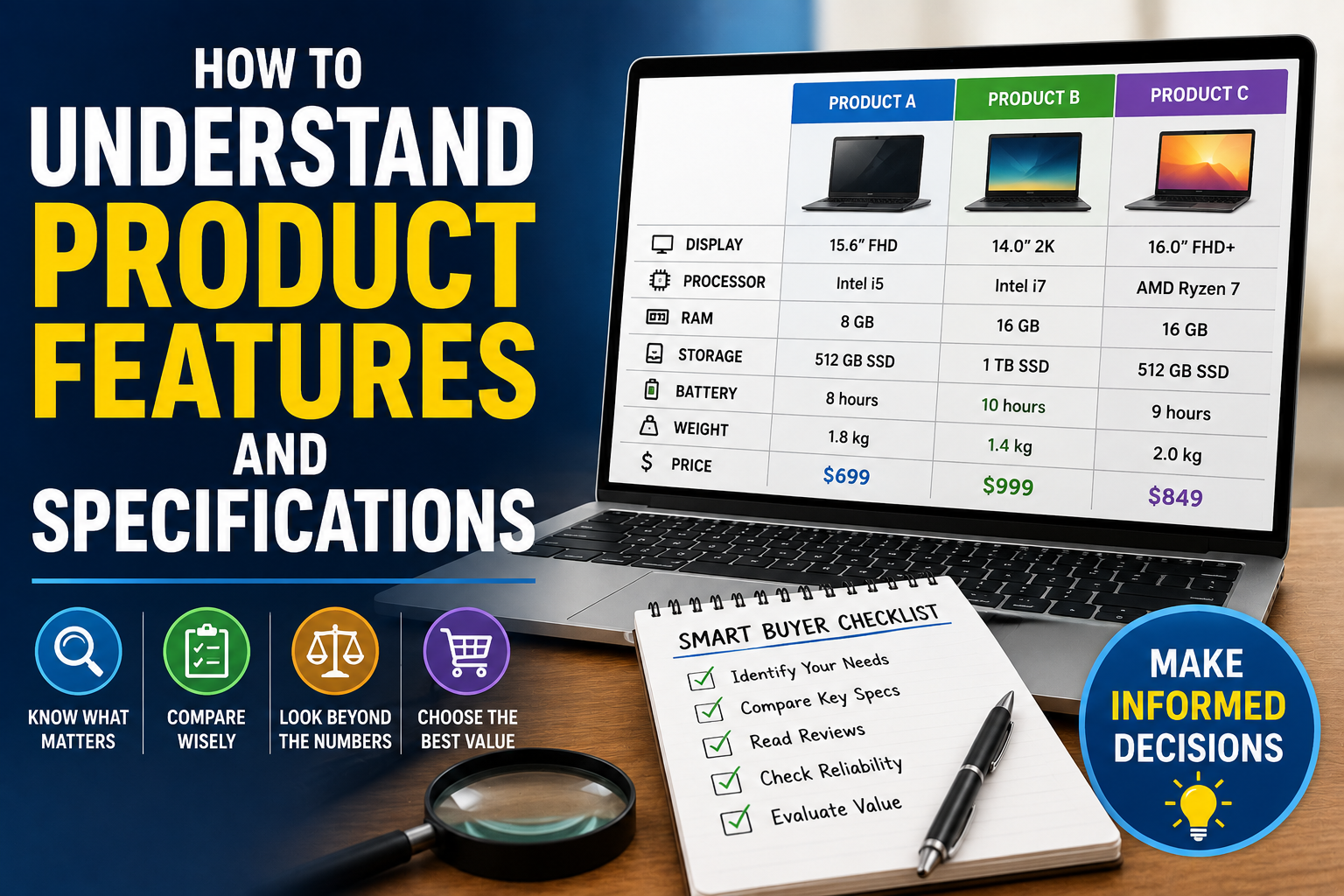
Once you understand the important specifications, create a simple comparison.
For example:
| Specification | Product A | Product B | Product C |
|---|---|---|---|
| Storage | 256 GB | 512 GB | 256 GB |
| RAM | 8 GB | 12 GB | 16 GB |
| Battery | 5,000 mAh | 4,800 mAh | 5,200 mAh |
| Weight | 190 g | 205 g | 198 g |
| Water resistance | Yes | Yes | No |
| Warranty | 2 years | 1 year | 2 years |
A comparison table makes differences easier to see.
However, do not automatically choose the product with the most impressive specifications.
Instead, assign greater importance to the specifications that directly affect your intended use.
For a broader decision-making framework, see How to Make Better Buying Decisions When Choosing Products.
Look Beyond Manufacturer Claims
Manufacturer specifications are useful, but they represent only one source of information.
A specification sheet tells you what a product is designed to offer. It does not always tell you how the product performs in everyday conditions.
Independent reviews can help answer questions such as:
- How long does the battery actually last?
- How good is the camera?
- Does the device overheat?
- Is the software easy to use?
- How durable does the product feel?
- Are advertised performance levels realistic?
- Are there common reliability problems?
This is why good buying research combines specifications with real-world testing.
Learning how to interpret that evidence is covered in How to Read Product Reviews Like an Expert.
Watch for Marketing Language
Product descriptions often contain words such as:
- Professional
- Premium
- Revolutionary
- Ultra-fast
- Advanced
- Powerful
- Intelligent
- Cutting-edge
- Next-generation
These terms can attract attention, but they are not specifications.
A useful habit is to translate marketing language into measurable questions.
Instead of asking whether a product is “ultra-fast,” ask:
How fast is it under a relevant workload?
Instead of accepting “long-lasting battery,” ask:
How many hours does it last under realistic usage?
Instead of trusting “professional camera quality,” examine independent photos and video tests.
The goal is to turn marketing claims into evidence that can actually be compared.
Be Careful With Specifications That Cannot Be Compared Directly
Numbers from different products may have been measured under different conditions.
Battery estimates are a good example.
One manufacturer might advertise battery life based on video playback, while another might use a different testing method.
The numbers may therefore look directly comparable even when they are not.
Whenever possible, compare results measured using the same methodology.
This is another reason independent testing can be useful.
Price Should Be Evaluated Alongside Specifications
Specifications have value only in relation to price.
A product with better hardware may not be worth paying substantially more for if the difference has little practical effect on your use.
Consider questions such as:
- How much more does the better specification cost?
- Will I actually notice the difference?
- Will I use the additional capability?
- How long will I keep the product?
- Does the more expensive option provide better durability or support?
Understanding how price relates to features, costs and perceived value is also important, as explained in How Product Pricing Works and What Determines Whether a Product Is Worth Its Price.
This helps shift the decision from “Which product has the best specifications?” to “Which product provides the best value for me?”
Think About the Product’s Expected Lifespan
A purchase should not necessarily be evaluated only on its first day.
Consider how long you expect to use the product.
If you plan to keep a laptop for six years, spending a little more on additional memory, storage or processing capability may make sense if it extends the device’s useful life.
If you expect to replace a product within a short period, paying for expensive features you will rarely use may not make sense.
Long-term value is therefore closely connected to expected lifespan.
Make a Shortlist Before Making a Decision
Once you have researched the specifications, narrow your options to a small shortlist.
Three to five products are usually easier to compare meaningfully than dozens.
For each finalist, consider:
- Essential features: Does it meet your basic requirements?
- Performance: Is it powerful enough for your intended use?
- Compatibility: Will it work with your existing setup?
- Reliability: Does independent testing suggest it is dependable?
- Support: Will the manufacturer continue supporting it?
- Total cost: What will you pay over the product’s useful life?
- Value: Does the product justify its price?
When reliability is an important part of the decision, it is useful to go beyond specifications and examine How to Determine Whether a Product Is Durable and Reliable.
This approach reduces the temptation to keep chasing specifications indefinitely.
The Specification That Matters Most Is the One You Will Use
Understanding product specifications is ultimately about translating technical information into practical value.
A longer battery may matter if you travel frequently. More storage may matter if you work with large files. A faster processor may matter if you edit video. Water resistance may matter if you regularly use a device outdoors.
But those same specifications may be largely irrelevant to someone with completely different needs.
The best buying decision is therefore rarely based on choosing the product with the longest list of features or the biggest numbers.
Instead, it comes from understanding what each specification actually means, determining which capabilities matter to you and comparing real-world performance against the price.
Once you develop that habit, product specification sheets become much less intimidating. They stop being collections of technical jargon and become useful tools for deciding where your money is most likely to deliver genuine value.