Complete Guide to Software Licensing
Software is everywhere—from the operating system running your laptop to the mobile apps on your phone and the cloud platforms businesses use every day. Yet many users install and use software without fully understanding what they are legally allowed to do with it.
That is where software licensing comes in.
A software license defines how software can be used, copied, modified, distributed, or shared. It can determine whether you may install a program on multiple devices, modify its source code, use it commercially, transfer it to another person, or redistribute a modified version.
Understanding software licensing is important for individuals, developers, businesses, schools, and organizations. Choosing the wrong license—or misunderstanding an existing one—can create unnecessary costs, security concerns, compliance problems, or legal disputes.
This complete guide explains the major types of software licenses, how they work, their advantages and disadvantages, and what users and businesses should consider before accepting or purchasing software.
What Is Software Licensing?
Software licensing is the legal framework that determines how software may be used, distributed, modified, or accessed.
When you purchase or download software, you generally do not purchase ownership of the underlying software itself. Instead, the copyright holder grants you certain permissions through a license.
For example, a license might allow you to:
- Install software on one computer
- Install it across multiple company devices
- Use it for personal purposes
- Use it commercially
- Modify its source code
- Create derivative works
- Share copies with other people
- Access the software through the internet
- Use the software for a limited period
The specific permissions depend on the license agreement.
For a broader understanding of the software ecosystem that these licenses govern, see The Complete Guide to Apps.
Why Software Licenses Matter
Software licenses establish the relationship between the software creator and the person or organization using the software.
For individual users, licensing determines what they can legally do with an application.
For businesses, licensing can affect:
- Operating costs
- Compliance requirements
- Procurement decisions
- Employee access
- Intellectual property rights
- Data management
- Software audits
- Security policies
- Vendor relationships
- Business continuity
For developers, licensing determines how other people can use and build upon their work.
A software license can therefore be much more than a legal document hidden behind an installation screen. It can directly influence how software is developed, distributed, maintained, and monetized.
How Software Licensing Works
A typical software license grants a user specific rights while reserving other rights for the copyright owner.
Consider a commercial desktop application.
The developer might give you permission to:
Install and use the software on one computer.
At the same time, the license might prohibit you from:
- Copying the application for other users
- Selling unauthorized copies
- Reverse engineering it where prohibited by applicable law
- Removing copyright notices
- Redistributing the software
The license therefore establishes a set of permissions and restrictions.
The exact terms vary considerably between licenses, so users should not assume that two applications can be used in the same way simply because both are free to download.
Software Ownership vs Software Licensing
One of the most important concepts in software licensing is the difference between ownership and permission to use.
When you buy a physical product, such as a chair or a book, you generally acquire ownership of that particular physical item.
Software is different.
A software developer or company usually retains intellectual property rights in the software while granting customers a license to use it.
This means buying software does not necessarily give you the right to:
- Copy it freely
- Sell additional copies
- Modify its source code
- Distribute it publicly
- Install it on unlimited devices
Your rights depend on the applicable license.
Major Types of Software Licenses
Software licenses can be broadly divided into several categories.
The most important include:
- Proprietary software licenses
- Open-source licenses
- Freeware licenses
- Shareware licenses
- Public-domain software
- Subscription licenses
- Perpetual licenses
- Concurrent or floating licenses
- Site licenses
- Volume licenses
Some products combine several licensing models.
For example, software may be proprietary but sold through a monthly subscription.
1. Proprietary Software Licenses
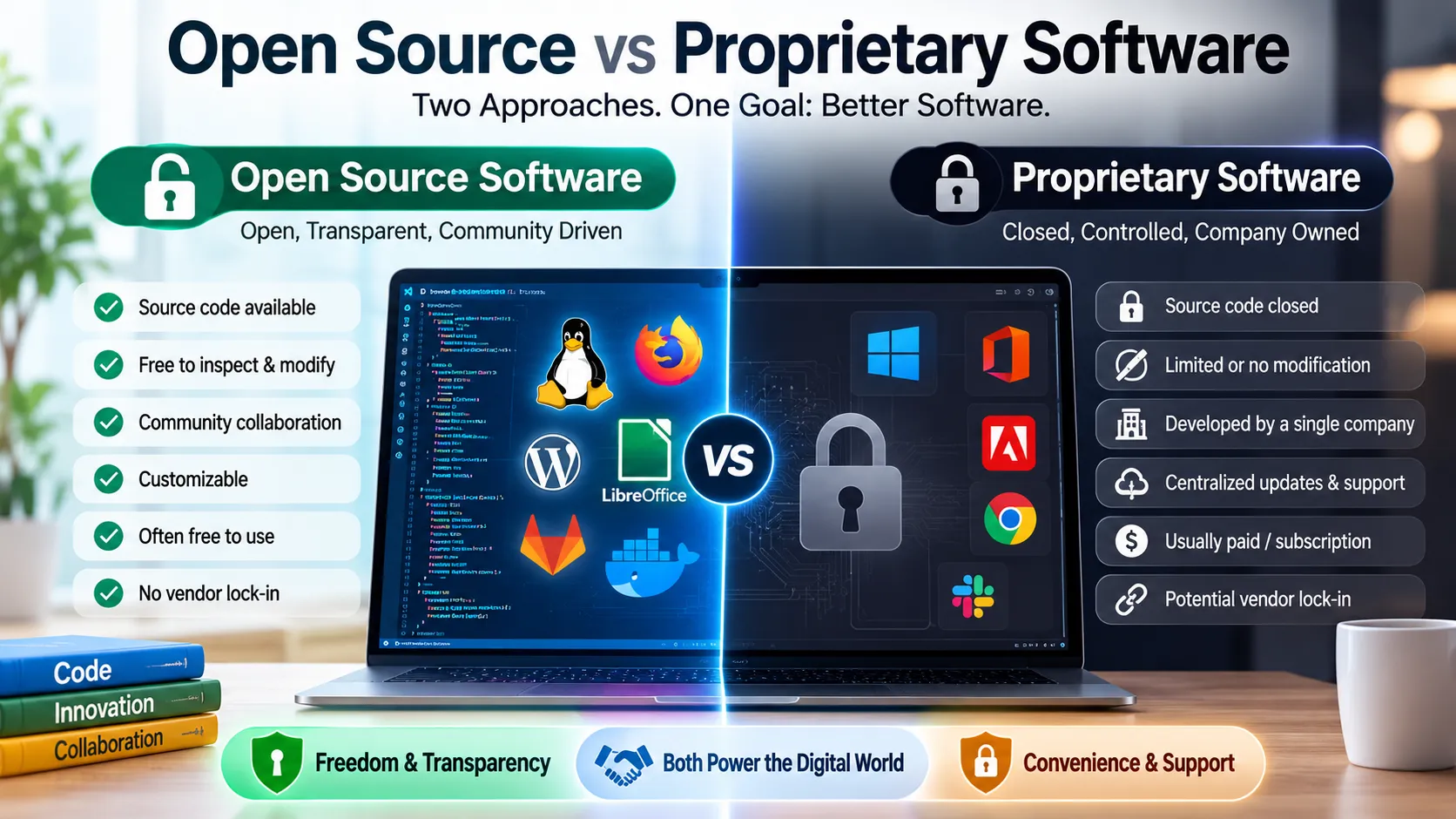
A proprietary software license gives users permission to use software while the copyright holder retains significant control over the software’s source code and distribution.
Most commercial software is proprietary.
Examples can include:
- Business applications
- Professional design software
- Accounting platforms
- Enterprise applications
- Commercial operating systems
- Many mobile applications
Users typically receive a defined set of permissions rather than unrestricted rights.
Advantages
Proprietary software can offer:
- Professional technical support
- Regular vendor updates
- Dedicated development teams
- Commercial warranties or service agreements
- Centralized security management
- Predictable product roadmaps
Disadvantages
Potential disadvantages include:
- Licensing costs
- Vendor dependence
- Restrictions on modification
- Limited control over source code
- Subscription expenses
- Compatibility concerns
2. Open-Source Software Licenses
Open-source software makes source code available under terms that allow users to inspect, modify, and often redistribute the software.
However, open source does not mean “no rules.”
Every open-source project has a license, and that license determines what users can legally do with the code.
Popular open-source licenses include:
- MIT License
- Apache License 2.0
- GNU General Public License
- GNU Lesser General Public License
- BSD licenses
- Mozilla Public License
These licenses have different requirements.
Permissive Open-Source Licenses
Permissive licenses generally allow substantial freedom to use, modify, and redistribute software.
The MIT License, for example, is known for having relatively few restrictions.
Permissive licensing can be attractive to companies because developers can often incorporate the software into larger projects under relatively flexible conditions.
Other commonly recognized permissive licenses include certain BSD licenses and the Apache License 2.0.
Copyleft Licenses
Copyleft licenses impose additional conditions on redistribution or derivative works.
The GNU General Public License, commonly known as the GPL, is a prominent example.
A major principle behind copyleft licensing is that certain freedoms provided by the original software should continue to be preserved when covered derivative works are distributed.
This can have important implications for commercial software developers.
Before incorporating GPL-licensed code into a proprietary product, organizations should carefully review the license and obtain appropriate legal guidance where necessary.
3. Freeware Licenses
Freeware generally refers to software that users can obtain and use without paying a purchase fee.
However, freeware is not necessarily open source.
A freeware application may provide no access to its source code and may prohibit modification or redistribution.
The important distinction is:
Free to use does not automatically mean free to modify or redistribute.
Freeware may still be protected by copyright and subject to significant licensing restrictions.
4. Shareware Licenses
Shareware is software distributed with the expectation that users may try it before purchasing or obtaining additional functionality.
A shareware product might provide:
- A time-limited trial
- A feature-limited version
- A limited number of uses
- A basic version with paid upgrades
The precise model depends on the developer.
Shareware became especially common in the distribution of desktop software before widespread software-as-a-service platforms became dominant.
5. Public-Domain Software
Software placed in the public domain is generally not protected by copyright in the same way as copyrighted software, although the legal treatment of public-domain material can vary by jurisdiction and circumstances.
Public-domain software should not be confused with open-source software.
Open-source software remains subject to a specific license. Public-domain software may have fewer copyright-based restrictions.
Some developers also use legal mechanisms intended to dedicate software to the public domain or provide extremely broad permissions.
6. Subscription Software Licenses
Modern software is increasingly distributed through subscriptions.
Instead of purchasing a permanent license, customers pay:
- Monthly
- Quarterly
- Annually
- Or according to another recurring schedule
Subscription software is particularly common with cloud-based applications.
For more context on how subscription-based applications are delivered, see Complete Guide to Cloud Software and SaaS.
Benefits of subscriptions
Users may receive:
- Continuous updates
- Technical support
- Cloud storage
- New features
- Security improvements
- Lower initial costs
Potential disadvantages
Long-term costs can become significant, particularly when multiple users or services are involved.
Organizations also need to consider what happens to their access and data when a subscription ends.
7. Perpetual Software Licenses
A perpetual license generally allows a customer to use a particular version of software indefinitely, subject to the terms of the license.
This does not necessarily mean the customer receives unlimited future updates.
For example, a company might purchase a perpetual license for version 5 of an application but need a separate purchase or agreement to obtain later major versions.
Perpetual licensing can make budgeting easier for organizations that prefer one-time purchases, although maintenance and support may be priced separately.
8. Concurrent Software Licenses
A concurrent license, sometimes called a floating license, allows a defined number of users to access software at the same time.
For example, an organization could have 100 employees who occasionally need an application but purchase only 20 concurrent licenses.
The system may allow 20 people to use the application simultaneously while preventing additional users from accessing it until a license becomes available.
This model can be useful when software usage varies significantly throughout the organization.
9. Site Licenses
A site license allows an organization to deploy software across a defined location, group, or organizational environment under agreed terms.
The exact definition of “site” varies between vendors.
A site license may cover:
- One office
- A campus
- A school
- A business location
- Multiple facilities
Organizations should carefully examine the contractual definition rather than assuming a site license means unlimited worldwide usage.
10. Volume Licensing
Volume licensing allows organizations to acquire multiple software licenses under a centralized agreement.
It is commonly used by:
- Large companies
- Government agencies
- Schools
- Universities
- Nonprofit organizations
Volume licensing can simplify deployment, administration, purchasing, and compliance.
The agreement may also provide pricing structures that differ from individual consumer purchases.
Software Licensing Models Compared
| License Model | Typical Payment | Source Code Access | Typical Use |
|---|---|---|---|
| Proprietary | Paid or subscription | No | Commercial software |
| Open source | Often free | Yes | Development and infrastructure |
| Freeware | Usually free | Usually no | Consumer utilities |
| Shareware | Trial then paid | Usually no | Trial software |
| Public domain | Usually free | Varies | Broadly unrestricted software |
| Subscription | Recurring | Usually no | Cloud and commercial apps |
| Perpetual | Usually one-time | Usually no | Traditional desktop software |
| Concurrent | Contract-based | Usually no | Enterprise environments |
| Site license | Contract-based | Usually no | Schools and organizations |
| Volume license | Contract-based | Usually no | Large deployments |
Free Software Is Not Always Open-Source Software
This distinction causes significant confusion.
The word free can refer to price, while software freedom can refer to legal rights.
For example, an application may cost nothing to download but still prohibit:
- Modifying the software
- Examining its source code
- Redistributing it
- Using it commercially
Open-source licenses, on the other hand, are designed around defined rights to access and use source code.
Therefore:
Freeware ≠ open source
and:
Open source ≠ necessarily free of all costs.
Organizations may pay for support, hosting, consulting, enterprise features, or other services surrounding open-source software.
What Is a Software End User License Agreement?
A Software End User License Agreement, commonly abbreviated EULA, is a legal agreement that establishes the terms under which an end user can use software.
A EULA may cover:
- Permitted installations
- Number of devices
- Authorized users
- Restrictions
- Intellectual property rights
- Warranty limitations
- Liability provisions
- Termination
- Updates
- Data collection
- Support
- Account requirements
Many commercial applications present their EULA during installation or account creation.
What Should You Look for in a Software License?
Before installing or purchasing software, examine the terms that matter most to your situation.
1. Number of Devices
Determine whether the license covers:
- One computer
- Multiple computers
- Mobile devices
- Virtual machines
- Servers
2. Number of Users
A license may be assigned to an individual, device, organization, or concurrent user pool.
3. Commercial Use
Some software licenses distinguish between personal and commercial use.
If you’re using software for a business, confirm that the license permits that use.
4. Redistribution
Developers should pay particular attention to redistribution rights.
If you’re incorporating third-party code into your application, determine whether you are permitted to distribute it with your product.
5. Modification
Check whether you are allowed to modify the software and whether modified versions can be distributed.
6. Duration
Determine whether the license:
- Expires
- Renews automatically
- Continues indefinitely
- Depends on an active subscription
7. Updates
A license may provide access to updates, but this should not be assumed.
Check whether updates are:
- Included
- Optional
- Available for an additional fee
- Limited to a particular subscription period
Understanding Software Licensing for Businesses
Businesses need a more structured approach to software licensing because employees may use hundreds or even thousands of applications.
A strong software licensing program should identify:
- What software the organization owns or subscribes to
- Who uses it
- How many licenses exist
- Where software is installed
- Which licenses expire
- Which subscriptions automatically renew
- Which applications contain sensitive data
- Which licenses have usage restrictions
This process is often called software asset management.
What Is Software License Compliance?
Software license compliance means using software according to the terms established by its license.
For a business, this might mean ensuring that the organization does not:
- Install more copies than permitted
- Exceed user limits
- Share restricted accounts
- Redistribute proprietary software
- Violate open-source obligations
- Continue using software after a license expires
Compliance is particularly important in large organizations because unauthorized software use can create financial and legal risks.
Common Software Licensing Mistakes
Even organizations with sophisticated IT departments can make licensing mistakes.
Installing Too Many Copies
A company might purchase 50 licenses but accidentally deploy software to 60 devices.
Ignoring License Expiration
Subscription and temporary licenses can expire without proper tracking.
Assuming Free Means Unrestricted
Free software can still have strict copyright and usage terms.
Mixing Open-Source Licenses Without Review
Different open-source licenses can impose different obligations.
Forgetting About Contractors
Organizations sometimes overlook software access provided to contractors, freelancers, or external partners.
Sharing Individual Accounts
Some licenses permit only the named user to access the software.
Failing to Review Renewals
Automatic subscription renewals can create unexpected costs.
Software Licensing and Open-Source Compliance
Organizations developing software increasingly depend on third-party open-source components.
A modern application can contain hundreds or even thousands of dependencies.
That makes license management important.
A responsible development process should identify:
- Which open-source components are being used
- Which licenses apply
- What obligations each license creates
- Whether attribution is required
- Whether notices must be distributed
- Whether source code must be provided under certain circumstances
- Whether modifications create additional obligations
Software composition analysis tools can help organizations inventory dependencies and identify licensing issues.
For complex projects, legal review may also be appropriate.
Software Licenses and Copyright
Software is generally protected by intellectual property law, including copyright.
Copyright can protect elements such as:
- Source code
- Object code
- Documentation
- Certain graphical assets
- Other original creative components
A license provides permissions from the rights holder.
This is why copying software without authorization can be different from simply using software under the terms provided by its license.
Software Licensing and Intellectual Property
Software can involve several types of intellectual property.
These may include:
- Copyright
- Trademarks
- Patents
- Trade secrets
- Database rights in some jurisdictions
A software license primarily addresses rights associated with using the software, but the complete legal picture can be more complicated.
For businesses developing or distributing software, intellectual-property management should therefore extend beyond the license alone.
Why Software Licenses Matter to Developers
Developers should decide how they want their software to be used before selecting a license.
For an open-source project, the license can influence:
- Commercial adoption
- Community contributions
- Redistribution
- Derivative projects
- Compatibility
- Corporate adoption
A permissive license may encourage widespread adoption.
A copyleft license may prioritize preserving certain freedoms when software is redistributed.
There is no universally “best” software license. The appropriate choice depends on the project’s goals.
How to Choose a Software License for Your Project
If you are releasing your own software, begin by answering several questions.
Do You Want Commercial Use?
If yes, select a license that clearly permits it.
Should Others Modify Your Code?
If you want users to modify the software, choose licensing terms that support that objective.
Should Derivative Works Remain Open?
If preserving openness in certain redistributed derivatives is important, a copyleft approach may be appropriate.
Do You Want Maximum Adoption?
A permissive license can make adoption easier in many development environments.
Are You Combining Third-Party Code?
You must also ensure that your chosen license is compatible with the licenses of your dependencies.
For important commercial projects, professional legal advice can help prevent expensive mistakes.
How Software Licensing Affects Consumers
Consumers may not think about licensing when downloading an application, but licensing terms can influence everyday use.
Before installing software, consider:
- How many devices can use it?
- Is it transferable?
- Does it require an internet connection?
- Is an account mandatory?
- What happens if the subscription ends?
- Can you export your data?
- Are commercial uses permitted?
- What happens when the software is discontinued?
These questions become especially important for applications that store important documents, photos, financial information, or business data.
They can also matter when comparing different types of desktop applications and cloud-based software.
Software Licensing in Cloud Applications
Cloud software introduces another important distinction.
With traditional desktop software, users may install software locally.
With cloud applications, the provider typically operates the infrastructure and users access the software through the internet.
Common cloud models include:
- Software as a Service
- Platform as a Service
- Cloud-hosted enterprise applications
A cloud subscription may therefore involve both software rights and contractual terms concerning services, data, availability, security, and account access.
What Happens When a Software License Expires?
The consequences depend on the license.
A license may:
- Stop allowing access
- Switch the application into a restricted mode
- Prevent updates
- Disable certain features
- Require renewal
- Continue allowing limited functionality
Businesses should not assume that software will behave the same way after expiration.
Important applications should have renewal dates tracked in advance.
How to Manage Software Licenses Effectively
Businesses can improve licensing management by maintaining a centralized software inventory.
A useful inventory should record:
| Information | Example |
|---|---|
| Software name | Business application |
| Vendor | Software provider |
| License type | Subscription |
| Number of licenses | 50 |
| Assigned users | 47 |
| Renewal date | Contract renewal date |
| Cost | Annual subscription |
| Business owner | IT department |
| Data sensitivity | High |
| Contract location | Procurement system |
Regular reviews can identify unused licenses, duplicate subscriptions, unauthorized installations, and upcoming renewals.
Software License Audits
A software license audit examines whether an organization’s software usage matches its licensing agreements.
An audit may review:
- Installed applications
- User accounts
- License certificates
- Purchase records
- Subscription agreements
- Deployment systems
- Open-source dependencies
Keeping accurate records makes audits easier and can help organizations identify problems before they become serious.
How Software Licensing Is Changing
Software licensing continues to evolve as technology changes.
Traditional one-time purchases remain relevant in some markets, but cloud subscriptions, usage-based pricing, enterprise agreements, and open-source ecosystems have transformed how software is distributed.
Artificial intelligence is also increasing the complexity of software licensing because modern applications may incorporate:
- Third-party models
- Open-source libraries
- Cloud APIs
- AI-generated components
- Data-processing services
- Model-specific terms
As software becomes increasingly interconnected, organizations will need to understand not only the license attached to an application but also the licenses and contractual terms governing its dependencies and services.
Frequently Asked Questions
Is software licensing the same as buying software?
No. Purchasing software often gives you a license to use it rather than ownership of the underlying intellectual property.
Is open-source software free?
Open-source software can be available without a purchase price, but “open source” primarily concerns rights to use, inspect, modify, and redistribute software under specified licensing terms.
Can free software be used commercially?
Sometimes. It depends on the license. Never assume that software being free to download automatically means commercial use is permitted.
Can I copy licensed software to another computer?
It depends on the license. Some licenses allow multiple installations, while others restrict the software to a specific device or user.
Can businesses use open-source software?
Yes. Businesses commonly use open-source software, but they must comply with the applicable license obligations.
What is a perpetual license?
A perpetual license generally grants continuing rights to use a particular version of software, subject to the license terms.
What is a subscription license?
A subscription license generally provides software access for a defined period in exchange for recurring payments.
Why are software licenses important?
They establish the legal permissions and restrictions governing how software can be used, modified, copied, and distributed.
A Practical Software Licensing Checklist
Before using software, ask:
- Who owns the software?
- What license applies?
- How many users are permitted?
- How many devices can be covered?
- Is commercial use allowed?
- Can the software be modified?
- Can it be redistributed?
- How long does the license last?
- What happens when it expires?
- Are updates included?
- What data does the application handle?
- Are there third-party dependencies?
- Are there open-source components?
- Are attribution or notice requirements involved?
- Does the organization need to maintain licensing records?
Answering these questions before deployment can prevent many common licensing problems.
Choosing the Right Licensing Approach
There is no single software licensing model that works for every product.
For consumers, the most important considerations are usability, cost, device restrictions, data access, and subscription terms.
For businesses, licensing decisions should also consider scalability, compliance, security, procurement, vendor dependency, and long-term operating costs.
For developers, the central question is often how much freedom they want to give users while protecting the project’s intellectual property and development model.
The best approach is therefore to treat licensing as part of software strategy rather than as an afterthought.
Why Software Licensing Deserves More Attention
Software licensing sits at the intersection of technology, business, intellectual property, and everyday digital use. Understanding the basic principles makes it easier to choose software responsibly, manage business applications efficiently, and avoid accidentally violating usage restrictions.
Whether you’re downloading a free application, subscribing to a cloud platform, deploying software across a company, or publishing your own open-source project, the license determines the boundaries of what you can do.
For everyday users, reading the important terms before clicking “Accept” can prevent unpleasant surprises. For developers and businesses, building a deliberate licensing strategy can protect intellectual property, control costs, and support sustainable software development.