How Document Management Software Stores, Organizes and Retrieves Documents
For many businesses, documents are everywhere.
Contracts sit in email inboxes. Invoices are stored in shared folders. Employee records may be scattered across cloud drives. Project files can end up on individual computers, while older paperwork remains locked away in filing cabinets.
As organizations grow, finding the right document can become surprisingly difficult.
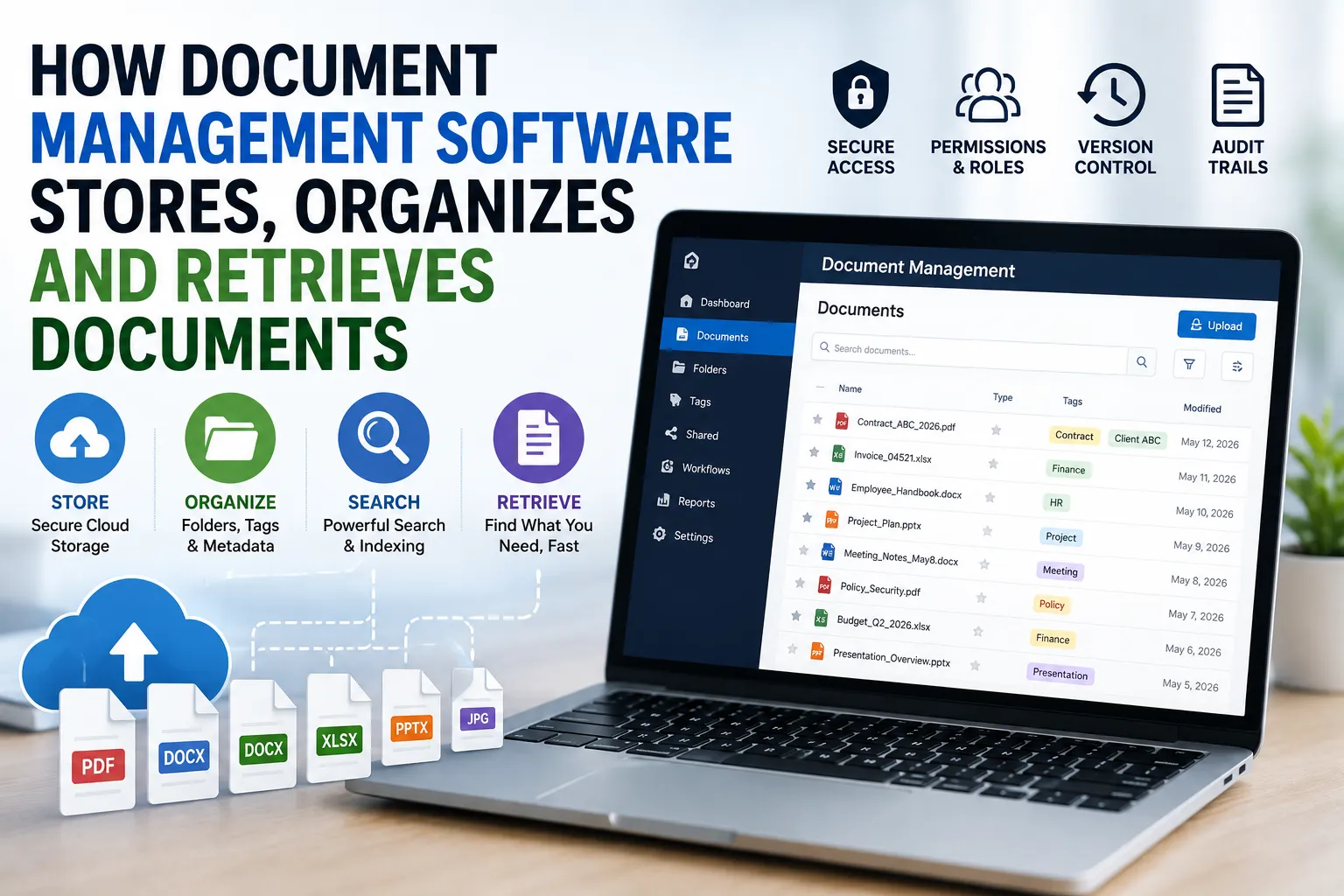
Document management software is designed to solve this problem by providing a centralized system for storing, organizing, searching and retrieving digital documents. Instead of relying on folders and filenames alone, modern platforms can use metadata, indexing, permissions, version control and automated workflows to make information easier to manage.
Understanding how these systems work helps explain why document management has become an important part of modern business operations.
What Is Document Management Software?
Document management software is a system that helps organizations manage digital documents throughout their lifecycle.
Depending on the platform, it can allow users to:
- Upload and store documents
- Organize files into folders or categories
- Search documents quickly
- Add tags and metadata
- Control who can access specific files
- Track document versions
- Record changes and activity
- Share documents securely
- Automate approval processes
- Archive older information
- Retrieve documents when they are needed
The software essentially creates a structured environment for information that might otherwise become difficult to control.
A simple system may function much like an organized digital filing cabinet. More advanced platforms can behave more like intelligent information-management systems.
Document management is one part of the broader software ecosystem covered in The Complete Guide to Apps.
How Documents Enter the System
The first step is getting documents into the management system.
Documents may originate in several ways.
A user might upload a Microsoft Word document, PDF, spreadsheet, image or presentation. Documents can also arrive through email integrations, scanning systems, cloud-storage connections or automated business processes.
Some systems support document scanning and optical character recognition (OCR).
OCR allows software to recognize text contained in scanned documents and convert it into machine-readable information.
That matters because a scanned invoice, for example, might otherwise be treated simply as an image.
With OCR, the system can potentially recognize information such as:
- Invoice numbers
- Names
- Dates
- Addresses
- Amounts
- Reference numbers
- Other text contained in the document
Once this information is available digitally, it becomes much easier to search and categorize.
Where Documents Are Stored
Document management platforms can store files in different ways depending on their architecture.
Some systems use cloud storage, while others are installed on an organization’s own servers. Some use a hybrid approach.
Cloud-based document management has become particularly popular because files can be accessed through authorized devices without requiring the organization to maintain all of the underlying storage infrastructure itself.
The physical location of the servers may be far removed from the user.
A person in an office might upload a contract through a web browser, while the actual file is stored in a remote data center.
The software handles the connection between the user and the underlying storage.
For a broader explanation of cloud-based applications and services, see the Complete Guide to Cloud Software and SaaS.
Files Are Usually Stored With Metadata
One of the biggest differences between ordinary file storage and document management is the use of metadata.
Metadata is information about a document.
For example, a company’s contract might have metadata such as:
- Document type: Contract
- Department: Legal
- Client: ABC Company
- Date created: March 12
- Expiration date: March 12 next year
- Owner: Legal Department
- Status: Active
- Confidentiality: Restricted
The document itself may contain hundreds or thousands of words, but metadata gives the system structured information that can be used for organization and retrieval.
This is one reason document management systems can be much more powerful than traditional folders.
Folder Structures Still Matter
Despite advances in search and metadata, folders remain useful.
Organizations can create structures based on departments, projects, clients, years or document types.
For example:
Company Documents
├── Finance
│ ├── Invoices
│ ├── Budgets
│ └── Reports
├── Human Resources
│ ├── Employee Records
│ ├── Policies
│ └── Recruitment
├── Legal
│ ├── Contracts
│ ├── Agreements
│ └── Compliance
└── Operations
├── Procedures

├── Projects

└── Suppliers
However, relying exclusively on folders can become problematic as organizations grow.
A document may logically belong to several categories at once.
Metadata and search allow the same information to be found without forcing users to remember exactly where it was placed.
Indexing Makes Documents Searchable
When a document enters the system, the software can create an index.
An index is a structured representation of information that allows the system to find documents quickly without examining every file from scratch each time someone performs a search.
This works in a similar conceptual way to the index at the back of a book.
Instead of reading every page to find a particular topic, you can consult the index to locate relevant pages.
Document management systems apply similar principles to large collections of digital information.
The index may include document names, metadata and, depending on the system, the actual text contained within documents.
Full-Text Search
Full-text search is one of the most useful features of modern document management systems.
Instead of searching only for filenames, users can search for words or phrases contained inside documents.
Imagine a company has thousands of contracts.
A user may not remember the name of the relevant file but may remember a phrase that appeared inside it.
A search for that phrase could return the relevant documents.
This can save considerable time compared with opening files individually.
OCR Extends Search to Scanned Documents
Full-text search becomes even more useful when combined with OCR.
Consider an organization with decades of scanned paper records.
Without OCR, searching those documents may require someone to open each file manually.
With OCR, the system can analyze the text in scanned pages and add it to its searchable index.
This effectively turns a collection of scanned images into a searchable information archive.
OCR is not perfect, particularly when documents contain poor handwriting, unusual fonts, damaged pages or complicated layouts. Nevertheless, it can dramatically improve the usefulness of digitized records.
Tags Provide Another Layer of Organization
Tags allow users to associate descriptive labels with documents.
A single file might have tags such as:
Contract
Client-A
2026
Legal
Renewal
Tags can make it easier to group and locate documents without relying on a strict folder structure.
They can also support automated workflows.
For example, a company could create a rule that identifies documents tagged “Contract” and “Renewal” and automatically sends them to the appropriate team for review.
Version Control Prevents Document Confusion
One of the most common problems with traditional document storage is having multiple versions of the same file.
A project might contain:
Proposal.docx
Proposal-final.docx
Proposal-final-2.docx
Proposal-final-revised.docx
Proposal-final-approved.docx
It may not be immediately obvious which version is actually current.
Document management software can solve this through version control.
Instead of creating unrelated files for every change, the system can maintain a history of revisions within a single document record.
Users may be able to see:
- Who changed the document
- When it was changed
- What version is current
- Previous versions
- Comments associated with revisions
Depending on the system, users may also be able to restore an earlier version.
Check-In and Check-Out Systems
Some document management platforms use check-in and check-out functionality.
When a user checks out a document, the system can temporarily prevent conflicting edits while that person works on it.
After the user finishes, the updated document is checked back in as a new version.
This approach can reduce situations where two employees make different changes to the same file and one person’s work accidentally overwrites the other’s.
Modern cloud collaboration systems can also allow multiple people to edit documents simultaneously, but the underlying goal remains the same: maintaining a reliable record of changes.
Access Controls Protect Sensitive Documents
Not every employee should have access to every document.
A document management system can use permissions to determine who is allowed to view, edit, download, share or delete particular files.
Permissions may be assigned based on:
- Individual users
- Departments
- Job roles
- Groups
- Document classifications
- Organizational locations
For example, an employee in the marketing department might have access to campaign documents but not confidential payroll records.
A human resources manager could have access to employee files that ordinary employees cannot see.
This principle of limiting access according to business needs is an important part of information security.
Authentication Adds Another Security Layer
Access controls determine what an authorized user can do.
Authentication determines whether the person attempting to access the system is actually who they claim to be.
Document management platforms can support authentication methods such as passwords, single sign-on and multi-factor authentication.
Multi-factor authentication can require users to provide an additional verification method beyond a password.
This can reduce the risk associated with stolen or compromised credentials.
Audit Trails Record What Happens to Documents
Many document management systems maintain audit trails.
An audit trail records activities involving documents.
Depending on the system, it might record:
- Who opened a document
- Who edited it
- When it was downloaded
- Who shared it
- When permissions changed
- Which version was created
- When a document was deleted
Audit trails can be particularly valuable for organizations that need to demonstrate compliance or investigate unusual activity.
They can also help answer a simple but important question:
What happened to this document?
Document Workflows Automate Repetitive Tasks
Document management software can do more than store information.
It can also move documents through predefined workflows.
Consider a company that receives supplier invoices.
A workflow could automatically send a new invoice to an employee for verification. Once approved, it could move to a finance manager. After final approval, it could be sent to an accounting system for payment.
The exact workflow depends on the organization, but the principle is the same.
Instead of employees manually deciding where every document goes next, the software can automate predictable steps.
Approvals Can Be Built Into the System
Approval workflows are particularly useful for documents that require multiple levels of authorization.
Examples include:
- Purchase requests
- Contracts
- Expense reports
- Policies
- Marketing materials
- Legal documents
- Financial statements
The system can notify the appropriate person when an action is required.
This can reduce the risk of documents becoming stuck in email inboxes.
It can also provide a record of who approved what and when.
Retention Policies Help Organizations Manage Old Documents
Not every document should be kept forever.
Organizations may have legal, regulatory or operational requirements determining how long certain records should be retained.
Document management systems can support retention policies that specify what should happen to documents after a particular period.
Depending on the policy, a document might be:
- Kept in active storage.
- Moved to an archive.
- Flagged for review.
- Automatically deleted when legally and operationally appropriate.
Automating retention can reduce the amount of outdated information stored indefinitely.
However, retention rules must be configured carefully. Automatically deleting information that an organization is legally required to preserve can create serious problems.
Archiving Keeps Older Information Accessible
Documents that are no longer used regularly do not necessarily need to disappear.
Archiving allows organizations to move older information into a less active storage area while retaining access when necessary.
An archived document might be required years later for an audit, legal dispute, historical reference or customer inquiry.
A well-designed archive therefore balances accessibility with storage efficiency.
Backups Protect Against Data Loss
Storage alone does not guarantee that documents are safe.
Files can be lost because of hardware failures, software problems, accidental deletion, security incidents or other unexpected events.
Backups provide another copy of important information that can be restored if something goes wrong.
A robust document management strategy should therefore consider:
- Backup frequency
- Backup locations
- Recovery procedures
- Data redundancy
- Retention periods
- Disaster recovery
Organizations should also periodically test whether their backups can actually be restored.
A backup that cannot be recovered when needed provides little practical protection.
Cloud Systems and Data Availability
Cloud-based document management can make files accessible from multiple locations.
An employee might work from an office, home or another location while accessing the same document repository, assuming they have appropriate permissions and an internet connection.
This can be especially useful for organizations with distributed teams.
However, accessibility must be balanced against security.
Organizations need to establish appropriate authentication, permissions, encryption and sharing controls so that convenience does not create unnecessary exposure.
How Document Retrieval Works
When a user searches for a document, the system typically examines its index rather than scanning every stored file individually.
A search might involve several criteria at once.
For example:
Find all active contracts for Client A created after January 2026.
The system can use metadata and indexed content to narrow the results.
A more sophisticated search could combine:
- Keywords
- Document type
- Author
- Date
- Department
- Tags
- Status
- Client
- Location
- File format
The result is a much more targeted retrieval process than manually browsing folders.
Artificial Intelligence Is Changing Document Management
AI is increasingly being incorporated into document management systems.
Modern tools can analyze documents and assist with tasks such as classification, summarization, information extraction and semantic search.
Instead of searching for an exact phrase, a user might ask a natural-language question such as:
“Show me the active supplier contracts that expire within six months.”
An AI-powered system may interpret the request, identify relevant metadata and return matching documents.
AI can also help extract structured information from unstructured documents.
For example, it might identify a contract’s:
- Parties
- Effective date
- Expiration date
- Renewal terms
- Payment obligations
- Governing law
This can significantly reduce the amount of manual document review required for certain tasks.
Semantic Search Goes Beyond Exact Keywords
Traditional search often depends heavily on matching words.
Semantic search attempts to understand the meaning behind a query.
For example, someone searching for:
“documents about employee vacation policies”
might receive relevant documents even if they use terms such as “annual leave” rather than “vacation.”
This is possible because modern search systems can use language models and other techniques to understand relationships between concepts.
For organizations with enormous document repositories, semantic search could make previously difficult information much easier to discover.
Document Management and Collaboration
Document management systems can also improve collaboration.
Instead of sending multiple attachments through email, employees can work from a centralized document.
This reduces the risk of people unknowingly editing outdated versions.
Collaboration features may include:
- Comments
- Review tools
- Shared workspaces
- Notifications
- Version histories
- Approval workflows
- Real-time editing
- Document links
The exact features vary between platforms, but the broader objective is to keep teams working from reliable and accessible information.
Integrations Connect Documents to Other Software
Documents rarely exist independently from other business systems.
A contract may be connected to a customer relationship management platform. An invoice may relate to an accounting system. An employee document may be associated with a human resources platform.
Document management software can integrate with other applications through connectors, APIs and built-in integrations.
This allows information to move between systems without requiring employees to repeatedly upload or download files manually.
Integration can also reduce duplicate data entry.
What Happens When a Document Is Deleted?
Deletion is more complicated than pressing a delete button.
In a basic file system, deleting a document may simply remove it from the visible folder.
A document management platform may have additional rules.
Depending on its configuration, deletion could involve:
- Moving the file to a recycle bin
- Marking it for deletion
- Removing access while retaining the record
- Preserving it because of a legal hold
- Permanently destroying it after an approved retention period
These controls can help organizations prevent accidental or unauthorized destruction of important records.
Legal Holds Can Override Normal Deletion
Organizations sometimes become involved in lawsuits, investigations or regulatory proceedings.
In such circumstances, certain documents may need to be preserved even if their normal retention period has expired.
A legal hold can prevent relevant information from being automatically deleted.
This is one reason document management systems can be particularly important for organizations operating in highly regulated environments.
The ability to preserve records systematically can reduce the risk of accidentally destroying information that may later be required.
The Benefits Go Beyond Paper Reduction
Document management software is often described as a way to create a paperless office.
Reducing paper is certainly one benefit, but the larger advantage is information control.
A well-managed system can help organizations:
- Find information faster
- Reduce duplicate files
- Improve collaboration
- Protect confidential information
- Track document changes
- Automate approvals
- Maintain records
- Support compliance
- Recover from data loss
- Reduce administrative work
The real value comes from making information easier to manage throughout its lifecycle.
Choosing a Document Management System
Organizations evaluating document management software should look beyond the number of features advertised.
Important considerations include:
### Search capabilities
Can users quickly find documents using metadata, full-text search and natural-language queries?
### Security
Does the system provide strong authentication, permissions, encryption and activity monitoring?
### Version control
Can users easily determine which document version is current?
### Integration
Can the platform connect with the other software the organization already uses?
### Scalability
Will the system remain practical as the organization accumulates more documents and users?
### Usability
A technically powerful system will provide limited value if employees find it difficult to use.
### Compliance
Does the platform support the organization’s legal, regulatory and recordkeeping requirements?
### Backup and recovery
What happens if documents are accidentally deleted or the system experiences an outage?
These considerations can be more important than simply choosing the platform with the longest feature list.
## The Goal Is Reliable Access to Information
At its core, document management software solves a deceptively simple problem: helping people find and use the information they need without losing control of it.
The process begins when documents enter the system. They are stored, indexed and associated with metadata. Search tools make them discoverable, while permissions control who can access them. Version histories preserve changes, workflows move documents through business processes and retention policies determine what happens as information ages.
Increasingly, AI is adding another layer by allowing systems to understand document content and respond to more natural questions.
As businesses continue generating enormous amounts of digital information, document management is becoming less about replacing filing cabinets and more about building a reliable information infrastructure.
The organizations that manage that information effectively can spend less time searching for documents and more time using the knowledge those documents contain.