How Note-Taking Apps Help Organize Information and Digital Knowledge
Modern life generates an enormous amount of information. People save articles, attend meetings, collect ideas, write reminders, research topics, manage projects and communicate across dozens of digital platforms.
Without a reliable system for organizing that information, useful knowledge can quickly become difficult to find.
This is where note-taking apps have become increasingly valuable. Instead of keeping information scattered across notebooks, email inboxes, screenshots and disconnected documents, users can bring notes into a searchable digital workspace.
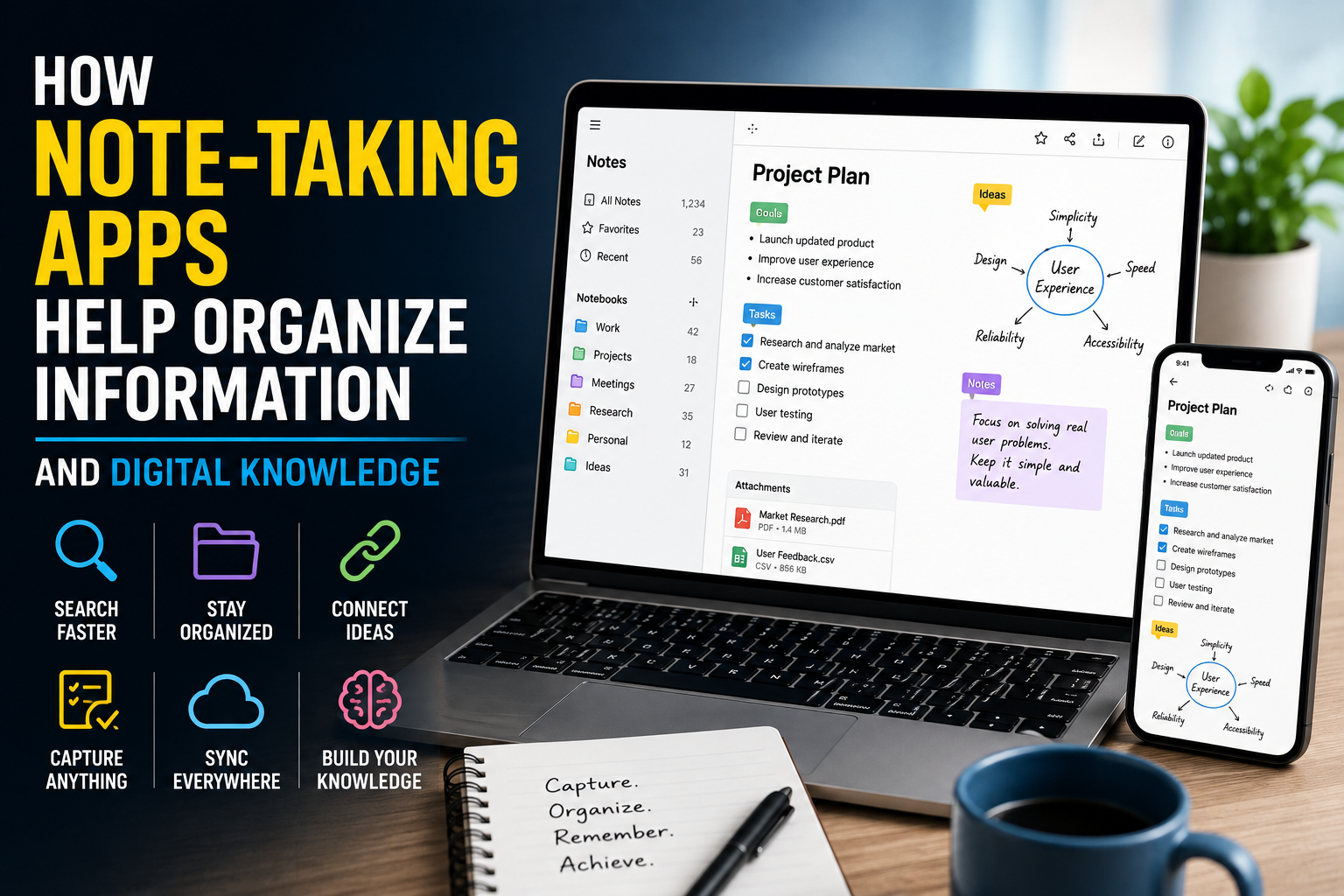
The best note-taking apps are more than electronic versions of paper notebooks. They can help users connect ideas, organize projects, retrieve information quickly and gradually build a personal library of knowledge.
For a broader overview of how different applications fit into the software ecosystem, see The Complete Guide to Apps.
## What Is a Note-Taking App?
A note-taking app is software designed to let users create, store, organize and retrieve digital notes.
Basic applications may offer little more than a text editor and folders. More advanced platforms can support:
- Text formatting
- Checklists
- Images
- Audio recordings
- File attachments
- Web links
- Tags
- Search
- Tables
- Handwritten notes
- Voice-to-text
- Document scanning
- Synchronization across devices
- Links between notes
- Collaboration
- AI-powered features
This range of capabilities makes note-taking apps useful for everything from a simple grocery list to a complex research project.
## Why Digital Information Becomes Difficult to Manage
The problem is often not a lack of information but an excess of it.
A person may have important information spread across:
- Email messages
- Messaging apps
- Browser bookmarks
- Cloud documents
- Screenshots
- Paper notebooks
- PDFs
- Photos
- Calendar entries
- Computer files
Each location can work independently, but finding a specific piece of information later can become frustrating.
A note-taking system creates a central place where information can be captured and organized.
Instead of asking, “Where did I save that?” users can potentially search one system and find what they need.
## Search Makes Old Information More Useful
One of the biggest advantages of digital notes is search.
Paper notebooks require users to remember where something was written. Digital notes can often be searched by words, phrases, titles or tags.
Suppose someone takes notes during a meeting six months ago and remembers only that the discussion involved a particular client and budget issue.
A search can potentially locate the relevant note within seconds.
This changes the value of stored information. Notes are no longer useful only when users remember exactly where they put them.
They become part of a searchable personal information archive.
## Folders Provide a Simple Organizational Structure
Folders are one of the most familiar ways to organize digital information.
A user might create folders for:
- Work
- Personal
- School
- Finances
- Travel
- Research
- Projects
- Ideas
Within those categories, additional folders can separate individual projects or subjects.
Folders are especially useful for people who prefer a straightforward hierarchy.
However, organizing everything into increasingly complicated folder structures can eventually create its own problem. If users spend more time deciding where a note belongs than actually writing it, the system becomes difficult to maintain.
A good organizational structure should make information easier to find rather than create additional administrative work.
## Tags Add Another Layer of Organization
Tags provide a different way to categorize information.
Instead of assigning a note to only one folder, users can attach multiple tags.
For example, a note about a business project could have tags such as:
#marketing #research #client #strategy
This allows the same note to appear conceptually in several categories.
Tags can be particularly useful when information crosses multiple subjects.
The challenge is avoiding excessive tagging. Creating dozens of tags with overlapping meanings can make the system harder to understand.
A small, consistent tagging system is usually easier to maintain.
## Linking Notes Can Create a Knowledge Network
Some note-taking applications allow users to connect one note to another.
This can be particularly powerful for research and long-term learning.
Imagine someone researching climate science. Instead of keeping isolated notes about individual topics, they could connect notes about:
- Atmospheric circulation
- Carbon dioxide
- Ocean temperatures
- Renewable energy
- Ecosystems
- Climate models
Over time, these connections can create a network of related information.
This approach can help users see relationships between ideas rather than treating every note as an isolated document.
## Note-Taking Apps Can Support Different Types of Knowledge
Not all information belongs in the same format.
A student might need lecture notes and study questions. A journalist might collect interview notes, source information and story ideas. A business owner might maintain meeting records, project plans and strategic ideas.
Note-taking apps can accommodate many of these formats within one system.
This flexibility allows users to build a personal knowledge base that reflects how they actually work.
## Capturing Information Quickly Matters
A note-taking system is only useful if information gets into it.
For this reason, quick capture is an important feature.
Mobile apps allow users to record an idea immediately. Browser extensions can save web pages or selected text. Voice input can capture thoughts while someone is away from a computer.
Some applications also support shortcuts or widgets that allow a new note to be created within seconds.
The less friction involved in capturing information, the more likely people are to use the system consistently.
## Meeting Notes Become Easier to Manage
Note-taking apps can be especially useful in professional environments.
Instead of keeping meeting notes in separate documents, users can create a standardized structure.
A meeting note might include:
Date:
Participants:
Agenda:
Decisions:
Action items:
Follow-up date:
This structure makes information easier to review later.
When meeting notes are searchable and connected to related project information, users can also reconstruct the history of decisions more easily.
## Students Can Build Digital Study Libraries
Students can use note-taking applications to organize information across courses and subjects.
Instead of keeping all information in one continuous document, they can create separate notes for individual lectures, concepts, assignments and study sessions.
Digital notes also make it easier to reorganize information when preparing for examinations.
A student might create a central topic page that links to individual notes containing definitions, examples, questions and summaries.
This can turn scattered class material into a more structured study resource.
## Researchers Can Connect Sources and Ideas
Research often involves collecting information from many sources.
A note-taking app can serve as an intermediate layer between those sources and the final piece of work.
Researchers can record:
- Source names
- Important findings
- Quotes
- Questions
- References
- Personal observations
- Connections between studies
Keeping these details organized can make it easier to return to the original material later.
It is still important to preserve proper citations and source information rather than relying on memory or copied fragments.
## Note-Taking Apps Can Help With Project Management
Although dedicated project-management software is often better for complex workflows, note-taking apps can be useful for smaller projects.
A project page might contain:
- Objectives
- Deadlines
- Meeting notes
- Research
- Task lists
- Relevant links
- Decisions
- Draft ideas
This keeps background information close to the work itself.
For individuals managing several projects, having a dedicated note for each project can also reduce the mental effort of remembering what happened previously.
## Digital Notes Can Reduce Cognitive Load
Writing information down has an important practical benefit: it reduces the need to keep every detail in your head.
Instead of remembering a phone number, idea, task or research finding, users can store it in a system they trust.
This does not eliminate the need to remember important information. Instead, it allows the brain to focus more on thinking and less on constantly trying to retain every detail.
The system becomes an external memory for information that does not need to remain in immediate working memory.
## AI Is Changing Digital Note-Taking
Artificial intelligence is increasingly being incorporated into note-taking software.
Depending on the application, AI features may help users summarize notes, identify key points, search information using natural language, organize content or transform rough notes into more structured material.
For example, a long meeting note might be converted into a short list of decisions and action items.
These features can save time, particularly when users accumulate large amounts of information.
However, AI-generated summaries should be checked carefully, especially when notes contain important business, financial, academic or professional information.
Automation can make information easier to process, but it does not eliminate the need for human judgment.
## Synchronization Makes Information Available Everywhere
Cloud synchronization is another major advantage of modern note-taking apps.
A note created on a computer can often become available on a phone or tablet within moments.
This means users do not have to choose one device as their permanent information center.
A person might capture an idea on a smartphone while traveling, expand it on a laptop later and review it from a tablet during a meeting.
For people who work across multiple devices, synchronization can make the entire system more convenient.
This is closely related to the broader capabilities provided by cloud software and SaaS.
## Offline Access Still Matters
Cloud-based software is convenient, but users should not assume that an internet connection will always be available.
Some applications support offline access, allowing users to view or edit notes without an active connection and synchronize changes later.
This can be especially useful during travel, on unreliable networks or in locations where connectivity is limited.
When choosing a note-taking system, users should understand what happens to their information when they are offline.
## Privacy Should Be Part of the Decision
A personal knowledge base can contain highly valuable information.
It might include work documents, personal plans, research, financial information, passwords or private thoughts.
That makes privacy and security important considerations.
Users should understand:
- Where their notes are stored
- Whether data is encrypted
- Which devices can access the account
- Whether information is used for AI training or other purposes
- What happens when an account is deleted
- Whether data can be exported
- What third-party integrations can access
Sensitive information deserves particular care.
A note-taking app should not automatically become a storage location for passwords, confidential documents or other sensitive data unless its security features are appropriate for that purpose.
## Backups Protect Against Data Loss
Digital organization does not eliminate the risk of losing information.
Accounts can be compromised, services can change, devices can fail and users can accidentally delete important notes.
Regular backups can provide an additional layer of protection.
If an application supports data export, users should periodically consider exporting important information into a format they can preserve independently.
A knowledge system becomes more valuable over time, which makes protecting accumulated information increasingly important.
## Avoid Building an Overly Complicated System
One of the most common mistakes with digital note-taking is creating a system that is too complicated to maintain.
Users can spend hours designing elaborate folders, tags, databases and templates before actually using the system.
A simpler approach is often more effective.
Start with a few basic categories and improve the structure only when a genuine problem appears.
The goal is not to create the most sophisticated note-taking system possible. The goal is to create one that users will continue using months and years later.
## Organize Information Around Retrieval
A useful note-taking system should be designed around a simple question:
How will I find this information when I need it?
That question can influence titles, folders, tags and links.
For example, a note titled “Meeting” provides little information. A title such as “Marketing Strategy Meeting — August 2026” is much easier to identify later.
Clear titles and consistent naming conventions can make search significantly more useful.
## Build a Habit of Reviewing Notes
Capturing information is only half of the process.
Old notes can become difficult to use if they are never reviewed.
A periodic review can help users identify:
- Outdated information
- Unfinished tasks
- Important ideas
- Duplicate notes
- Projects that need attention
- Information that should be archived
Reviewing notes also creates an opportunity to connect ideas that were originally captured at different times.
This is where a collection of notes can gradually become a genuine knowledge system.
## Choosing the Right Note-Taking Approach
There is no single organizational method that works for everyone.
Some people prefer simple folders and notebooks. Others benefit from tags, linked notes and databases. Some need powerful collaboration features, while others primarily want a fast place to capture ideas.
The right choice depends on how the information will be used.
A student may prioritize handwriting and study organization. A business professional may care more about collaboration and meeting notes. A researcher may need advanced linking and reference management.
The best application is therefore not necessarily the one with the most features. It is the one that fits the user’s workflow without creating unnecessary complexity.
## Turning Notes Into a Personal Knowledge Base
A note-taking app becomes especially powerful when individual notes stop functioning as isolated pieces of information.
A meeting note can connect to a project. A research finding can connect to an article idea. A book summary can connect to another concept. A task can connect to the notes explaining why it matters.
Over time, these relationships can transform a collection of notes into a personal knowledge base.
The objective is not simply to store more information. It is to make existing information easier to understand, retrieve and use.
## Making Digital Information Work for You
The real value of note-taking apps is not the act of typing words into a digital document. It is the ability to turn scattered information into something that can be retrieved, connected and reused.
Search reduces the time spent looking for information. Folders and tags provide structure. Links reveal relationships between ideas. Synchronization keeps information available across devices, while automation and AI can reduce repetitive organizational work.
But technology alone does not create an effective knowledge system. Consistent habits, clear naming, sensible organization and regular review matter just as much.
When those habits are combined with the right digital tools, a note-taking app can become more than a place to write things down. It can become a searchable external memory—a living library of ideas, decisions, research and knowledge that grows more useful over time.