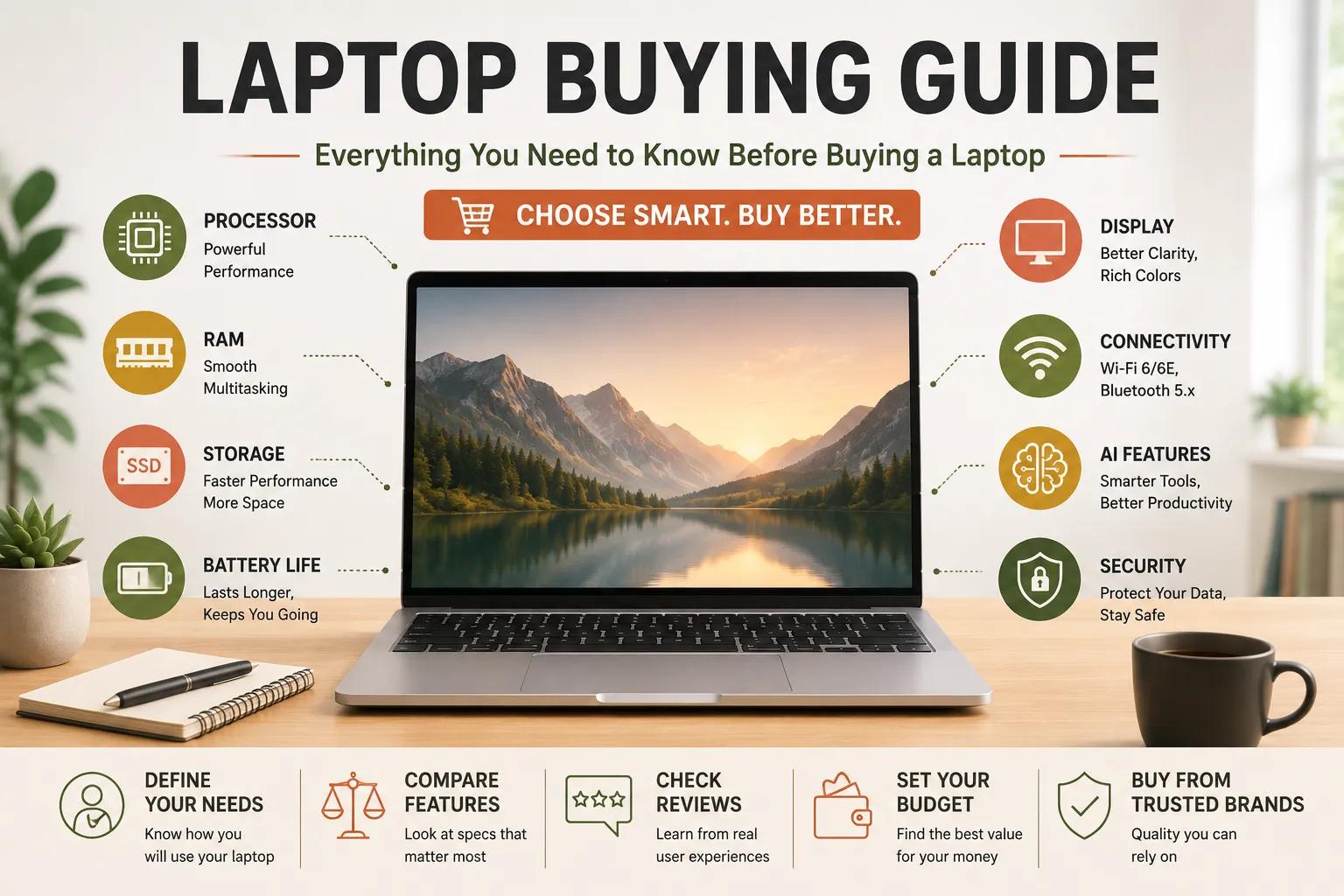
Everything You Need to Know Before Buying a Laptop
Buying a laptop has never been more challenging or more exciting. Today’s market offers hundreds of models designed for students, professionals, gamers, creators, and everyday users. With advances in processors, artificial intelligence (AI), battery technology, and display quality, modern laptops are more powerful than ever. However, choosing the right one requires understanding more than just price or brand.
Whether you’re purchasing your first laptop or replacing an aging device, making an informed decision can save money and ensure your computer meets your needs for years to come. This comprehensive buying guide explains the most important factors to consider before purchasing a laptop, helping you choose a device that balances performance, portability, battery life, and value.
This article is part of our broader guide to what consumer gadgets are and how modern gadgets work, which explains the hardware, software, connectivity, and other technologies behind modern consumer devices.
Why Choosing the Right Laptop Matters
A laptop is one of the most important technology investments many people make.
The right laptop can help you:
- Work efficiently
- Study effectively
- Create digital content
- Play games
- Stream entertainment
- Manage business tasks
- Stay connected anywhere
Buying the wrong laptop, however, may result in poor performance, limited storage, short battery life, or costly upgrades sooner than expected.
Step 1: Decide How You’ll Use Your Laptop
Before comparing specifications, identify your primary use.
| User Type | Recommended Laptop |
|---|---|
| Student | Lightweight, long battery life |
| Office Professional | Reliable productivity laptop |
| Remote Worker | Business laptop with webcam and security features |
| Gamer | Dedicated gaming laptop |
| Content Creator | High-performance laptop with powerful graphics |
| Programmer | Fast processor, ample RAM, comfortable keyboard |
| Casual User | Affordable everyday laptop |
Understanding your needs prevents overspending on unnecessary features.
For a broader framework for evaluating different types of consumer devices, see How to Choose the Right Technology Devices.
Step 2: Choose the Right Operating System
The operating system affects software compatibility and user experience.
Windows
Best for:
- General users
- Business
- Gaming
- Engineering
- Students
Pros:
- Wide software support
- Large hardware selection
- Excellent compatibility
macOS
Best for:
- Creatives
- Video editors
- Designers
- Apple ecosystem users
Pros:
- Smooth performance
- Excellent battery life
- Strong security
- Premium build quality
ChromeOS
Best for:
- Students
- Web browsing
- Cloud-based work
Pros:
- Affordable
- Fast startup
- Simple interface
- Excellent battery life
Linux
Best for:
- Developers
- IT professionals
- Advanced users
Pros:
- Highly customizable
- Secure
- Open source
For a deeper explanation of the software platforms that manage computer hardware and applications, see The Complete Guide to Operating Systems.
Step 3: Understand Laptop Processors (CPU)
The processor is the brain of the laptop.
Common processor families include:
Intel
- Core i3 – Basic tasks
- Core i5 – Most users
- Core i7 – Power users
- Core i9 – Professional workloads
- Core Ultra – AI-enhanced modern laptops
AMD
- Ryzen 3
- Ryzen 5
- Ryzen 7
- Ryzen 9
AMD processors often provide excellent performance and value.
Apple Silicon
Apple’s M-series chips combine high performance with exceptional battery efficiency.
Examples include:
- M2
- M3
- M4
Step 4: How Much RAM Do You Need?
RAM affects multitasking performance.
| RAM | Best For |
|---|---|
| 8 GB | Web browsing, office work |
| 16 GB | Most users (recommended) |
| 32 GB | Content creation, programming |
| 64 GB+ | Professional video editing, AI, engineering |
For long-term value, 16 GB is the recommended minimum for most buyers.
Step 5: Choose the Right Storage
Modern laptops typically use Solid-State Drives (SSDs).
Benefits include:
- Faster boot times
- Faster application loading
- Better durability
- Lower power consumption
Recommended storage:
- 256 GB – Basic users
- 512 GB – Recommended
- 1 TB – Creators and professionals
- 2 TB+ – Large media libraries
Step 6: Display Quality
The display directly affects comfort and productivity.
Important considerations include:
Screen Size
- 13–14 inches – Highly portable
- 15–16 inches – Balanced choice
- 17 inches – Desktop replacement
Resolution
- Full HD (1920×1080) – Recommended minimum
- QHD – Sharper images
- 4K – Professional editing and premium viewing
Panel Type
- IPS – Excellent color and viewing angles
- OLED – Rich colors and deep blacks
- Mini-LED – Bright, high contrast
Step 7: Battery Life
Battery life varies depending on workload and hardware.
Typical expectations:
- 6–8 hours – Entry-level laptops
- 8–12 hours – Good productivity laptops
- 12–18+ hours – Premium ultrabooks
If you travel frequently, prioritize longer battery life.
Understanding charging technology can also help you evaluate how quickly a laptop can replenish its battery and how charging systems affect everyday use. See our Complete Guide to Charging Technology for more information.
Step 8: Graphics Performance
Most users rely on integrated graphics.
Dedicated graphics are recommended for:
- Gaming
- 3D modeling
- Video editing
- CAD software
- AI development
Integrated graphics are sufficient for:
- Office work
- Streaming
- Web browsing
- Education
Step 9: Build Quality
A well-built laptop lasts longer.
Look for:
- Aluminum chassis
- Reinforced hinges
- Comfortable keyboard
- Precision touchpad
- Durable construction
Premium materials improve both durability and user experience.
Step 10: Connectivity
Useful ports include:
- USB-C
- USB-A
- HDMI
- Headphone jack
- SD card reader
- Thunderbolt
- Ethernet (on some models)
Also consider:
- Wi-Fi 6 or Wi-Fi 7
- Bluetooth 5.x
Because wireless standards are an important part of how modern devices communicate, the Complete Guide to Wireless Connectivity provides additional context on technologies such as Wi-Fi and Bluetooth.
Step 11: Webcam and Microphone
Video conferencing has become increasingly important.
Look for:
- 1080p webcam
- AI noise cancellation
- Quality microphones
- Privacy shutter
These features improve online meetings and remote work.
Step 12: AI Features
Many modern laptops now include AI-powered capabilities.
Examples include:
- Live captions
- Background blur
- AI photo editing
- Intelligent battery optimization
- Productivity assistants
- Voice enhancement
- On-device AI processing
AI-enabled processors are expected to become increasingly common.
Step 13: Security Features
Security should not be overlooked.
Recommended features include:
- Fingerprint reader
- Facial recognition
- TPM security chip
- Device encryption
- Privacy webcam shutter
Business users may require additional enterprise-grade security.
Step 14: Consider Upgradability
Some laptops allow upgrades to:
- RAM
- SSD
- Wi-Fi card
- Battery
Others have components permanently soldered.
If long-term flexibility matters, check upgrade options before buying.
Laptop Buying Mistakes to Avoid
Avoid these common mistakes:
- Buying based only on price
- Ignoring battery life
- Choosing too little RAM
- Buying insufficient storage
- Overpaying for unnecessary features
- Ignoring warranty coverage
- Forgetting portability
- Choosing outdated hardware
A balanced configuration usually provides the best value.
Should You Buy a Budget, Mid-Range, or Premium Laptop?
| Category | Best For |
|---|---|
| Budget | Students, casual users |
| Mid-range | Most buyers |
| Premium | Professionals, creators, power users |
For most people, a mid-range laptop offers the best balance of performance and affordability.
Future Laptop Trends
Laptop technology continues to evolve rapidly.
Emerging trends include:
- AI PCs
- More efficient processors
- Better battery technology
- OLED displays
- Wi-Fi 7
- Improved sustainability
- Faster SSDs
- Enhanced security hardware
Future laptops are expected to become even more powerful while remaining thinner and lighter.
Common Myths About Buying Laptops
| Myth | Reality |
|---|---|
| More expensive always means better. | The best laptop depends on your needs, not just its price. |
| Bigger screens are always better. | Larger laptops are heavier and less portable. |
| More storage is always necessary. | Cloud storage reduces the need for extremely large drives for many users. |
| Gaming laptops are ideal for everyone. | They are heavier, consume more power, and often cost more than necessary. |
| Any laptop will last 10 years. | Lifespan depends on hardware quality, maintenance, and usage. |
Frequently Asked Questions
How much RAM should I buy?
For most users, 16 GB offers the best balance of performance and future-proofing.
Is an SSD better than an HDD?
Yes. SSDs are significantly faster, quieter, more durable, and more energy-efficient.
What screen size is best?
A 14- or 15-inch laptop offers a good balance between portability and workspace.
Are AI laptops worth buying?
If you frequently use productivity tools, video conferencing, or AI-powered applications, AI-enabled laptops can provide useful performance and efficiency improvements.
How long should a good laptop last?
A quality laptop typically lasts between five and eight years, depending on usage, hardware, and maintenance.
Should I prioritize battery life or performance?
It depends on your needs. Travelers may prioritize battery life, while gamers and creators often require higher performance.
Conclusion
Buying a laptop is about finding the right balance between performance, portability, battery life, display quality, and budget. Rather than focusing solely on specifications or brand names, consider how you’ll use the device on a daily basis and choose features that match your specific requirements.
Modern laptops offer remarkable capabilities, from AI-powered productivity tools and high-resolution displays to powerful processors and long-lasting batteries. By understanding the key components—such as the CPU, RAM, storage, graphics, and operating system—you can make a confident purchasing decision that will serve you well for years to come.
Whether you’re a student, professional, creator, gamer, or everyday user, investing time in researching your options today can lead to a smarter purchase and a better overall computing experience.