Operating Systems Explained
Every time you unlock your smartphone, start your laptop, or use a smart TV, an operating system is working behind the scenes to make everything function smoothly. From managing hardware resources to launching applications and securing your data, the operating system (OS) serves as the foundation of every modern computing device. It is also a fundamental part of understanding consumer gadgets and how modern gadgets work.
Without an operating system, computers and mobile devices would be unable to perform the tasks users rely on every day. Whether you’re browsing the web, editing documents, playing games, or running business software, the operating system coordinates every interaction between hardware and software.
This guide explains what operating systems are, how they work, the different types available, and why they remain one of the most important pieces of software in modern technology.
What Is an Operating System?
An operating system (OS) is system software that manages a computer or device’s hardware and provides a platform for running applications.
It acts as the bridge between:
-
Users
-
Applications
-
Computer hardware
Without an operating system, most software would be unable to communicate directly with a device’s processor, memory, storage, or peripherals.
Why Operating Systems Matter
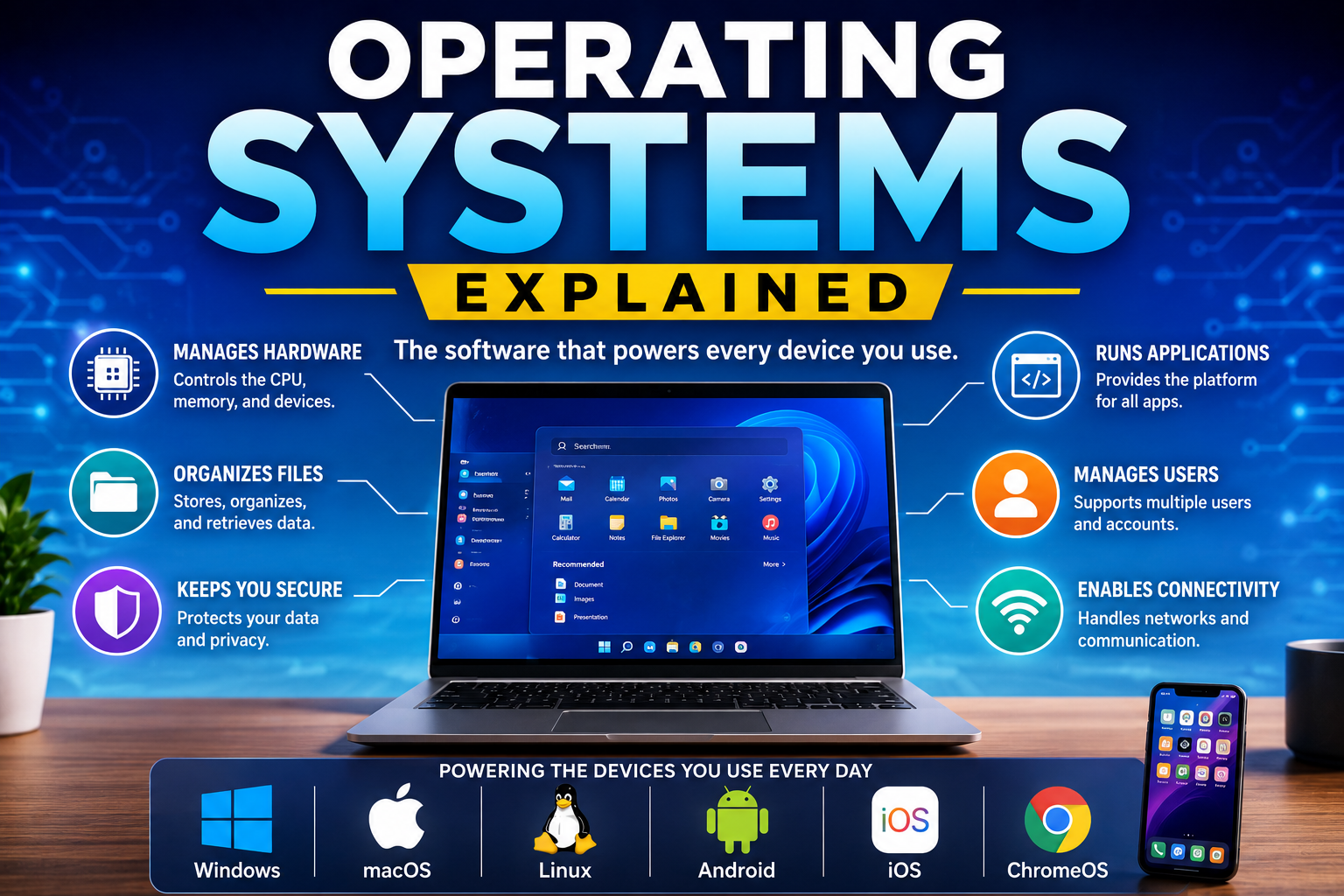
An operating system makes computing possible by organizing and managing the device’s resources.
Its primary responsibilities include:
-
Running applications
-
Managing memory
-
Controlling hardware
-
Organizing files
-
Handling user accounts
-
Providing security
-
Managing networking
-
Coordinating multitasking
Every action performed on a computer or smartphone depends on the operating system.
Understanding this relationship is also useful when exploring how modern software works, because operating systems provide many of the underlying services that applications depend on.
How an Operating System Works
When a device is powered on, the operating system loads into memory and begins managing system resources.
It coordinates:
-
Hardware initialization
-
User login
-
File management
-
Application execution
-
Memory allocation
-
Device communication
-
Background services
-
Security processes
This allows users to interact with applications through a graphical interface or command line without needing to control hardware directly.
Main Components of an Operating System
Kernel
The kernel is the core of the operating system.
It manages:
-
CPU resources
-
Memory
-
Hardware communication
-
System processes
-
Device drivers
Most operating system functions ultimately pass through the kernel.
User Interface
The user interface allows people to interact with the operating system.
Common interfaces include:
-
Graphical User Interface (GUI)
-
Command Line Interface (CLI)
Modern operating systems primarily use graphical interfaces featuring windows, icons, menus, and touch controls.
The interface also determines how people interact with the applications installed on their devices. This is particularly important on computers, where desktop applications work on personal computers through a combination of the operating system, application software, and underlying hardware.
File System
The file system organizes digital information.
It manages:
-
Documents
-
Photos
-
Videos
-
Applications
-
Folders
-
Storage devices
Efficient file management helps users locate and organize data easily.
Operating systems provide the foundation for the tools people use to create folders, move files, search storage, and manage digital information. A deeper look at how file management software stores, organizes and manages digital files explains this relationship in more detail.
Device Drivers
Drivers allow the operating system to communicate with hardware components.
Examples include:
-
Printers
-
Graphics cards
-
Keyboards
-
Cameras
-
Speakers
-
Storage devices
Without appropriate drivers, hardware may not function correctly.
Types of Operating Systems
Desktop Operating Systems
Desktop operating systems power personal computers and laptops.
Common features include:
-
Multitasking
-
Window management
-
File organization
-
Software installation
-
Networking
They are designed for general-purpose computing.
For a deeper look at the hardware that determines how laptops perform, see How Laptop Hardware Affects Performance and Everyday Use.
Mobile Operating Systems
Mobile operating systems are optimized for smartphones and tablets.
They focus on:
-
Touchscreen interaction
-
Battery efficiency
-
Wireless connectivity
-
Mobile applications
-
Security
-
Camera integration
These systems emphasize portability and ease of use.
This relationship between operating systems and mobile hardware is particularly important when considering what portable computing is and how modern mobile computers work.
Server Operating Systems
Server operating systems manage network resources and business infrastructure.
They prioritize:
-
Reliability
-
Scalability
-
Security
-
Performance
-
Multi-user access
Organizations use them to host websites, databases, cloud services, and enterprise applications.
Embedded Operating Systems
Embedded operating systems power specialized devices.
Examples include:
-
Smart TVs
-
Medical equipment
-
Industrial machinery
-
Cars
-
Smart appliances
-
Internet of Things (IoT) devices
They are typically designed for specific hardware and dedicated functions.
Popular Operating Systems
Several operating systems dominate today’s technology landscape.
These include:
-
Microsoft Windows
-
Apple macOS
-
Linux
-
Android
-
Apple iOS
-
ChromeOS
Each serves different users and use cases while sharing many core operating system principles.
Key Functions of an Operating System
Process Management
The operating system determines which programs run and how processor time is shared among them.
This enables multitasking, allowing users to run multiple applications simultaneously.
Memory Management
The OS allocates memory to applications as needed and ensures efficient use of system resources.
Proper memory management improves both speed and stability.
Storage Management
Operating systems organize storage devices by:
-
Creating folders
-
Saving files
-
Managing permissions
-
Allocating disk space
This makes data accessible and secure.
Security
Modern operating systems include numerous security features.
Examples include:
-
User authentication
-
Password protection
-
Encryption
-
Firewalls
-
Permission management
-
Software updates
Regular updates help address newly discovered security vulnerabilities.
Networking
Operating systems support communication across networks.
Networking capabilities include:
-
Internet connectivity
-
File sharing
-
Cloud synchronization
-
Wireless communication
-
Remote access
These features enable today’s connected digital experiences and work alongside the wireless connectivity technologies used by modern devices.
The Role of Updates
Software updates improve operating systems by:
-
Fixing bugs
-
Improving performance
-
Enhancing security
-
Adding new features
-
Supporting new hardware
Installing updates regularly helps keep devices stable and protected.
Updates are also an ongoing part of modern software management. For a broader explanation of the process, see How Software Updates Work and Matter.
Operating Systems and Applications
Applications rely on operating systems to function properly.
The operating system provides services such as:
-
Memory access
-
File storage
-
Display management
-
Input handling
-
Audio processing
-
Internet connectivity
This allows software developers to build applications without directly controlling hardware.
The same relationship applies across many types of software. The operating system provides the environment and system services that allow applications to install, run, communicate with hardware, access files, and interact with users.
For a broader look at the applications people use across computers and other devices, see The Complete Guide to Apps.
Challenges Facing Modern Operating Systems
As technology evolves, operating systems continue adapting to new demands.
Current challenges include:
-
Cybersecurity threats
-
Artificial intelligence integration
-
Cloud computing
-
Cross-device synchronization
-
Privacy protection
-
Battery efficiency
-
Hardware compatibility
-
Managing increasingly powerful processors
Manufacturers continually update operating systems to address these challenges.
The Future of Operating Systems
Operating systems are becoming increasingly intelligent and connected.
Emerging developments include:
-
AI-powered assistants
-
Improved automation
-
Cloud-native computing
-
Enhanced cybersecurity
-
Smarter power management
-
Cross-platform integration
-
Voice-controlled interfaces
-
Personalized user experiences
Artificial intelligence is expected to become more deeply integrated into future operating systems, helping users complete tasks more efficiently while improving device performance and security.
Final Thoughts
Operating systems are the foundation of every modern digital device, quietly managing the complex interactions between hardware, software, and users. From smartphones and laptops to servers and smart home devices, they make computing accessible, reliable, and efficient.
As technology continues advancing, operating systems will play an even greater role in supporting artificial intelligence, cloud services, cybersecurity, and seamless connectivity across devices. Understanding how operating systems work provides valuable insight into the software that powers nearly every aspect of today’s digital world.
Frequently Asked Questions
What is an operating system?
An operating system is system software that manages hardware resources and provides the environment needed for applications to run.
Why is an operating system important?
It coordinates hardware, manages files, controls memory, provides security, and enables users to run software efficiently.
What are the main types of operating systems?
The primary categories include desktop, mobile, server, and embedded operating systems.
Can a computer work without an operating system?
A computer can power on without an operating system, but it cannot perform most practical tasks or run standard applications until one is installed.
Why are operating system updates important?
Updates improve security, fix software bugs, enhance performance, add new features, and maintain compatibility with newer hardware and applications.
Key Takeaways
-
Operating systems serve as the foundation of all modern computing devices.
-
They manage hardware, memory, storage, security, networking, and applications.
-
Desktop, mobile, server, and embedded operating systems are designed for different purposes.
-
Regular updates improve performance, stability, and cybersecurity.
-
Modern operating systems increasingly incorporate artificial intelligence and cloud technologies.
-
Understanding operating systems helps users make better decisions about technology, security, and software.