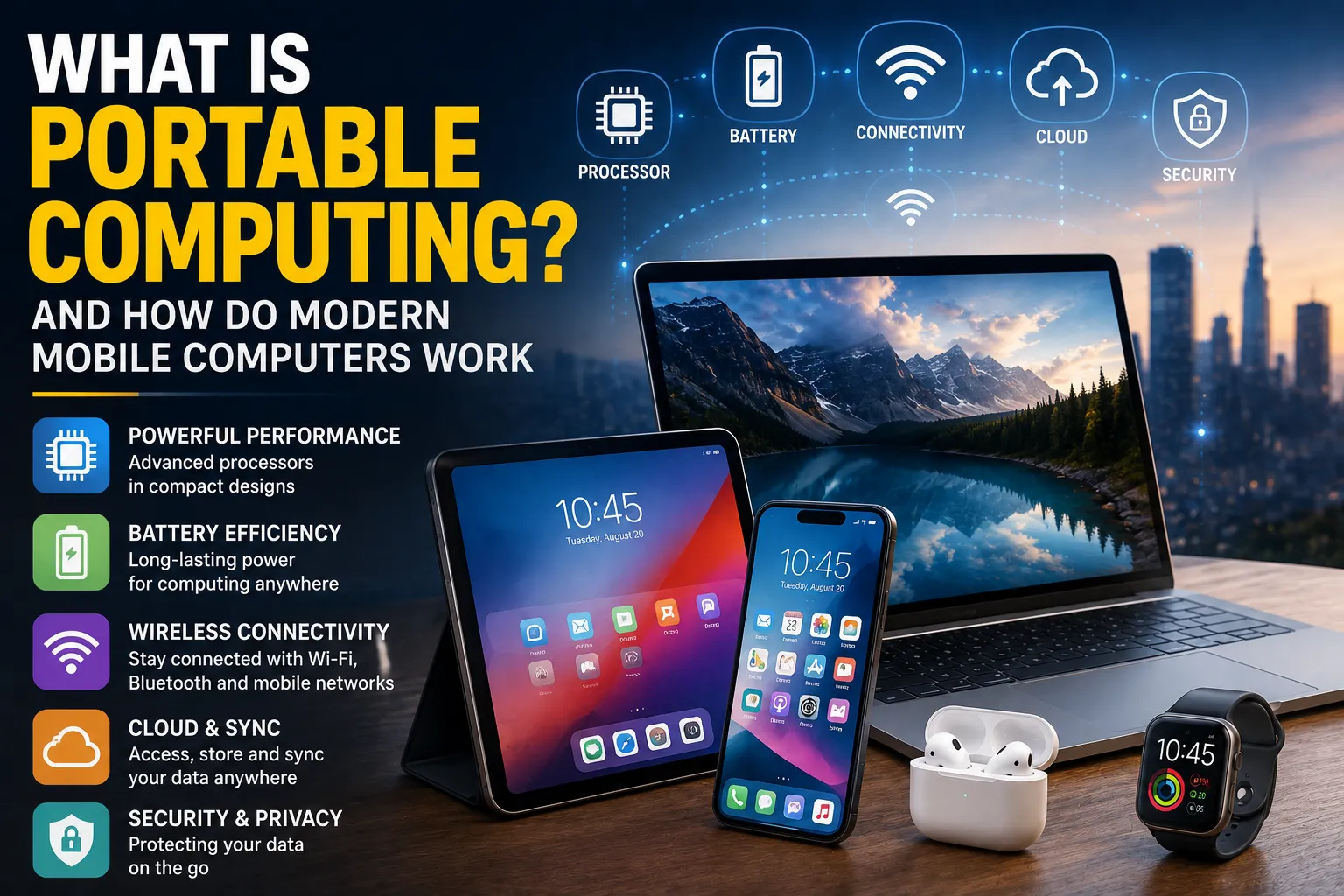
What Is Portable Computing and How Do Modern Mobile Computers Work?
Computing has changed dramatically from the days when computers occupied entire rooms and required dedicated facilities to operate. Today, powerful computing systems can fit inside a backpack, pocket, or even a wrist-worn device.
Laptops, tablets, smartphones, handheld gaming systems, and other mobile devices allow people to work, communicate, create content, access information, and run sophisticated applications almost anywhere.
This evolution is known as portable computing.
Portable computing combines compact hardware, efficient processors, battery technology, wireless connectivity, operating systems, and software to provide computing capabilities outside traditional desktop environments. Understanding how these systems work helps explain why modern mobile computers can perform tasks that once required large desktop machines.
What Is Portable Computing?
Portable computing refers to the use of computing devices that are designed to be easily carried and operated in different locations.
Unlike traditional desktop computers, portable computers are designed around mobility.
Examples include:
-
Laptops
-
Tablets
-
Smartphones
-
Handheld gaming devices
-
Portable workstations
-
Two-in-one computers
-
Some wearable computers
-
Portable data terminals
These devices differ considerably in size and capability, but they share a common objective: providing useful computing power without requiring a fixed workstation.
Portable computing is therefore not defined solely by how small a device is.
A powerful laptop may be considered a portable computer even though it is much larger than a smartphone because it can operate independently away from a desk.
For a broader explanation of how laptops and other devices fit into the consumer technology landscape, see What Are Consumer Gadgets and How Do Modern Gadgets Work?.
How Portable Computing Developed
Early computers were generally large, expensive machines that were difficult to move.
As electronic components became smaller, manufacturers began developing computers that could be used outside specialized computing facilities.
The development of several technologies helped accelerate this transition:
-
Smaller processors
-
More efficient memory
-
Compact storage
-
Rechargeable batteries
-
Smaller displays
-
Wireless networking
-
Energy-efficient operating systems
-
Smaller electronic components
Eventually, computing shifted from something people traveled to access into something people could carry with them.
The modern smartphone represents one of the most dramatic examples of this transformation.
What Makes a Computer Portable?
Several characteristics allow a computing device to operate effectively while being carried around.
Compact Hardware
Portable computers use components designed to fit inside relatively small enclosures.
Manufacturers carefully arrange:
-
Processors
-
Memory
-
Storage
-
Batteries
-
Displays
-
Cameras
-
Speakers
-
Wireless components
-
Cooling systems
The challenge is fitting these components into a limited space without creating excessive heat or consuming too much power.
Battery Power
A desktop computer normally receives continuous power from an electrical outlet.
A portable computer cannot rely on that arrangement.
Instead, it uses a rechargeable battery.
The battery stores electrical energy that can be converted into power for the device’s electronic components.
Battery capacity is commonly measured in units such as watt-hours (Wh).
A larger capacity generally means more stored energy, although actual battery life also depends on how much power the device consumes.
Energy-Efficient Processors
Portable devices have to balance performance with energy consumption.
A processor that performs extremely demanding calculations but consumes large amounts of electricity may be unsuitable for a thin mobile device.
Modern mobile processors therefore emphasize efficiency.
They can dynamically adjust their operating behavior depending on the workload.
For example, a device may consume relatively little energy while displaying a document but increase processing activity when running a demanding game or editing video.
The Processor Is the Computer’s Main Calculation Engine
At the center of a modern mobile computer is its central processing unit, or CPU.
The CPU executes instructions that tell the computer what to do.
These instructions can involve:
-
Mathematical calculations
-
Data movement
-
Logical comparisons
-
Program execution
-
Device communication
-
System management
When you open an application, the CPU helps execute the instructions required to launch and operate it.
However, modern mobile computers rarely rely on the CPU alone.
Mobile Computers Often Use System-on-a-Chip Designs
Many smartphones and tablets use a system-on-a-chip, commonly called an SoC.
Instead of placing major computing components on separate chips, an SoC can integrate multiple functions into a single package.
Depending on the design, an SoC may contain:
-
CPU cores
-
Graphics processing units
-
Memory controllers
-
Image processors
-
Neural processing units
-
Video encoders and decoders
-
Security components
-
Connectivity controllers
This integration can reduce physical space and improve power efficiency.
It is one of the major reasons modern mobile devices can provide significant computing power within compact designs.
CPU Cores Divide Computing Work
Modern processors commonly contain multiple CPU cores.
Each core can execute instructions independently, allowing the processor to handle multiple tasks more efficiently.
A mobile processor might contain different types of cores designed for different workloads.
Some cores can prioritize performance, while others are optimized for efficiency.
The operating system can distribute tasks between them depending on what the device is doing.
For example, background synchronization may require relatively little processing power, while demanding software may require considerably more.
Graphics Processing Handles Visual Work
Mobile computers also contain graphics-processing capabilities.
The graphics processing unit, or GPU, is designed to efficiently perform large numbers of calculations involved in producing images and animations.
GPUs are important for:
-
Games
-
Video playback
-
User interfaces
-
3D applications
-
Image processing
-
Video editing
-
Visual effects
Modern GPUs can also contribute to certain forms of general-purpose computing and artificial intelligence.
Memory Stores Active Information
Another important component is random access memory, commonly called RAM.
RAM provides temporary working space for the operating system and applications.
When you open several applications, the device may keep information associated with those applications in memory so that it can access it quickly.
RAM is different from long-term storage.
When the device is powered off, information stored in ordinary RAM is generally lost.
This is why computers need another form of storage for files and applications.
Storage Keeps Data Long Term
Portable computers use nonvolatile storage to retain information when the device is turned off.
Modern devices commonly use flash-based storage.
Storage contains information such as:
-
Operating system files
-
Applications
-
Photos
-
Videos
-
Documents
-
Music
-
Games
-
User settings
Storage capacity is typically measured in gigabytes or terabytes.
A device with more storage can hold more information, although available capacity also depends on how much space the operating system and installed applications consume.
Portable devices also depend on software that helps users organize and access those files. For a deeper look at this process, see How File Management Software Stores, Organizes and Manages Digital Files.
How the Operating System Controls Everything
Hardware alone does not provide a useful computing experience.
The operating system acts as a layer between applications, users, and hardware.
Examples of operating-system environments used across portable computing include:
-
Windows
-
macOS
-
Android
-
iOS
-
Linux-based systems
-
ChromeOS
The operating system manages resources such as:
-
CPU time
-
Memory
-
Storage
-
Networking
-
Input devices
-
Displays
-
Security
-
Applications
When an application needs to access hardware, it generally communicates through operating-system services rather than directly controlling the hardware.
For a deeper look at this relationship, see The Complete Guide to Operating Systems.
What Happens When You Open an Application?
Opening an application involves several steps.
Suppose you tap a mobile application icon.
The system may:
-
Receive your input
-
Locate the application
-
Load required data from storage
-
Allocate memory
-
Start application processes
-
Schedule CPU resources
-
Initialize required hardware or services
-
Display the application’s interface
Once running, the application interacts continuously with the operating system.
If it needs internet access, for example, it may request network services from the operating system.
If it needs to save a photograph, it may request permission to write data to storage.
The same basic relationship between applications, operating systems, and hardware also applies to traditional computer software. How Desktop Applications Work on Personal Computers provides a closer look at how those components interact on desktop systems.
Touchscreens Changed Portable Computing
One of the most significant developments in mobile computing was the widespread adoption of touchscreen interfaces.
Traditional computers rely heavily on:
-
Keyboards
-
Mice
-
Trackpads
Touchscreen devices allow users to interact directly with graphical elements.
A touchscreen can detect touch locations and gestures such as:
-
Tapping
-
Swiping
-
Pinching
-
Dragging
-
Long pressing
The operating system interprets these actions and translates them into commands that applications can understand.
Sensors Give Mobile Computers Environmental Awareness
Modern mobile devices contain numerous sensors that allow them to respond to their surroundings.
Depending on the device, these may include:
-
Accelerometers
-
Gyroscopes
-
Ambient light sensors
-
Proximity sensors
-
Magnetometers
-
Barometers
-
Fingerprint sensors
-
Cameras
-
GPS receivers
An accelerometer can detect changes in movement.
A gyroscope can help determine orientation.
An ambient-light sensor can measure surrounding light levels and help adjust screen brightness.
These sensors allow portable devices to behave differently depending on how and where they are being used.
Wireless Connectivity Is Essential
Portable computing would be far less useful without wireless communication.
Modern devices commonly support technologies such as:
-
Wi-Fi
-
Bluetooth
-
Cellular networks
-
Near-field communication
-
Global navigation satellite systems
These technologies serve different purposes.
Wi-Fi
Provides wireless access to local networks and the internet.
Bluetooth
Connects devices over relatively short distances.
It can be used for headphones, keyboards, controllers, watches, and other accessories.
Cellular connectivity
Allows smartphones and some laptops and tablets to connect to mobile networks over large geographic areas.
Near-field communication
Enables very short-range communication and is commonly used for contactless interactions.
For a broader explanation of the technologies that connect modern devices, see the Complete Guide to Wireless Connectivity.
How Mobile Internet Access Works
A cellular-enabled device contains radio hardware that communicates with nearby cellular network infrastructure.
When you browse the internet using mobile data, the process broadly looks like:
Mobile Device
↓Cellular Radio
↓Cellular Network
↓Carrier Network
↓Internet
↓Web Server
The device sends and receives packets of digital information through the network.
Modern cellular technologies can provide high-speed data connections suitable for streaming, video calls, gaming, cloud applications, and other demanding services.
GPS Helps Devices Understand Location
Many mobile devices contain satellite-positioning capabilities.
A device can use signals from navigation satellites to estimate its location.
Location information can support applications such as:
-
Maps
-
Navigation
-
Weather
-
Fitness tracking
-
Ride-hailing
-
Location-based search
-
Photography metadata
Applications generally require permission to access location information.
This is an important privacy consideration because location data can reveal information about where a person spends time.
Cameras Have Become Computing Systems
The camera in a modern smartphone is much more than a basic image sensor.
Capturing a photograph involves several stages.
The device may:
-
Capture light using an image sensor
-
Convert the captured information into digital data
-
Process the image
-
Adjust exposure and color
-
Reduce noise
-
Combine information from multiple frames
-
Store the resulting image
Modern image-processing systems can use computational photography techniques to improve photographs beyond what the physical camera hardware could achieve alone.
Artificial intelligence can also assist with tasks such as recognizing scenes, subjects and objects.
For more detail on this process, see How Smartphone Computational Photography Works.
Mobile Devices Manage Heat Carefully
Heat is one of the biggest challenges in compact computing.
Processors consume electrical energy, and some of that energy becomes heat.
A desktop computer may have enough physical space for large cooling systems.
A smartphone has considerably less room.
Mobile devices therefore use techniques such as:
-
Efficient processor designs
-
Dynamic performance adjustment
-
Thermal sensors
-
Heat-spreading materials
-
Software power management
-
Reduced processor activity during light workloads
When a device becomes too hot, it may reduce performance to protect the hardware and maintain safe operating conditions.
This behavior is sometimes called thermal throttling.
Power Management Is a Constant Process
A mobile operating system continuously balances performance and battery life.
When a device is idle, it can reduce activity.
Applications running in the background may have their activity restricted.
The screen may automatically reduce brightness.
Processors can enter lower-power states when their full performance is unnecessary.
These techniques allow a device to remain useful for longer without requiring a much larger battery.
For more on how charging technology supports modern portable devices, see the Complete Guide to Charging Technology.
Why Mobile Computers Can Become Warm
Heat generation is normal during demanding workloads.
A device may become warmer when:
-
Playing graphics-intensive games
-
Recording high-resolution video
-
Running demanding applications
-
Performing large downloads
-
Using navigation continuously
-
Charging while under heavy load
-
Processing large amounts of data
A moderate increase in temperature is generally expected.
However, excessive heat can reduce performance and affect battery longevity, which is why devices use thermal management systems.
Cloud Computing Extends Mobile Devices
Portable computers do not always perform every computation locally.
Cloud computing allows devices to use remote servers for storage, processing, and other services.
For example, a smartphone can upload a photograph to a cloud service and later retrieve it from another device.
A cloud application may also perform computationally intensive tasks remotely.
The relationship can be represented as:
Mobile Device
↓Internet
↓Cloud Servers
↓Processing / Storage
↓Internet
↓Mobile Device
This allows relatively compact devices to access capabilities that would otherwise require substantial local hardware.
Local Computing Versus Cloud Computing
Modern portable devices generally combine both approaches.
Local computing
Processing occurs directly on the device.
Advantages include:
-
Fast response
-
Offline operation
-
Greater privacy for some tasks
-
Reduced dependence on connectivity
Cloud computing
Processing or storage occurs on remote infrastructure.
Advantages can include:
-
Large storage capacity
-
Powerful remote processing
-
Synchronization
-
Access across multiple devices
-
Centralized services
Many applications use a hybrid approach.
For example, a device may process some information locally while sending other tasks to cloud servers.
Security Is Critical in Portable Computing
Portable computers are frequently lost, stolen or exposed to untrusted networks.
Security therefore plays an important role.
Modern devices may use:
-
Device encryption
-
Secure boot
-
Biometric authentication
-
Passwords and PINs
-
Application permissions
-
Hardware security modules
-
Remote device management
-
Network encryption
Biometric technologies such as fingerprints or facial recognition can make authentication more convenient, although they should generally be combined with broader security protections.
Application Sandboxing
Mobile operating systems often isolate applications from one another.
This concept is commonly known as sandboxing.
An application may have limited access to:
-
Files
-
Contacts
-
Cameras
-
Microphones
-
Location information
-
Other applications
The operating system can require the application to request permission before accessing certain resources.
Sandboxing reduces the ability of a compromised or malicious application to interfere with the rest of the device.
Software Updates Keep Mobile Computers Secure
Operating systems and applications receive updates for several reasons.
Updates can:
-
Fix bugs
-
Patch security vulnerabilities
-
Improve performance
-
Add features
-
Improve compatibility
-
Address reliability problems
Keeping software updated is one of the simplest ways users can improve the security and reliability of their devices.
However, users should also pay attention to how long a manufacturer provides security updates for a particular device.
For a broader explanation of why updates matter across modern computing systems, see How Software Updates Work and Matter.
Portable Computing Has Different Form Factors
Portable computing is not limited to laptops and smartphones.
Laptops
Laptops generally provide the most traditional computer experience while remaining portable.
They are commonly used for:
-
Productivity
-
Programming
-
Business
-
Education
-
Content creation
-
Gaming
Tablets
Tablets prioritize touch interaction and portability.
They are often used for:
-
Reading
-
Entertainment
-
Drawing
-
Browsing
-
Communication
-
Lightweight productivity
Smartphones
Smartphones combine communication, computing, cameras, sensors, internet connectivity and applications into a highly portable device.
Handheld Gaming Computers
These devices combine portable hardware with more powerful processors and graphics systems designed for gaming.
Two-in-One Computers
These devices can operate as both laptops and tablets.
They may use detachable keyboards or hinges that allow the display to rotate.
The Trade-Offs of Portable Computing
Portability comes with compromises.
A smaller device has limited physical space for:
-
Batteries
-
Cooling systems
-
Ports
-
Storage
-
Upgradable components
Manufacturers therefore have to balance several competing priorities.
A device might be:
Thinner but less expandable.
More powerful but hotter.
Lighter but have a smaller battery.
More compact but offer fewer physical ports.
More efficient but use less powerful hardware.
Good portable-device design is therefore largely an exercise in balancing competing requirements.
Why Battery Technology Matters So Much
Processor efficiency has improved considerably, but battery technology remains one of the major constraints in portable computing.
A device can only operate away from a charger for as long as its stored energy allows.
Manufacturers therefore work on several fronts:
-
More efficient processors
-
Better power management
-
Improved displays
-
Higher-density batteries
-
Faster charging
-
Lower-power connectivity
-
More efficient software
Improvements in any of these areas can extend practical battery life.
What Is Edge Computing?
Another important development is edge computing.
Instead of sending every task to a distant cloud server, some processing can occur closer to the user or device.
This can reduce latency and potentially improve privacy and reliability.
For example, an intelligent camera might analyze video locally rather than continuously sending every frame to a remote server.
Mobile devices are increasingly capable of performing sophisticated processing locally, making edge computing an important part of the broader mobile-computing ecosystem.
Artificial Intelligence Is Becoming Part of Mobile Computing
Artificial intelligence is increasingly integrated directly into portable devices.
Modern processors may contain specialized hardware designed to accelerate AI workloads.
These capabilities can support:
-
Speech recognition
-
Image processing
-
Translation
-
Generative AI
-
Personal assistants
-
Camera enhancements
-
Security detection
-
Predictive text
Some AI operations can occur directly on the device, while others can be handled by cloud infrastructure.
This combination of local and cloud AI is likely to remain important as mobile computing evolves.
The Future of Portable Computing
Portable computing is moving toward devices that are increasingly powerful, connected and context-aware.
Several developments are shaping the future.
More efficient processors
Better performance per unit of energy can allow smaller devices to perform increasingly demanding tasks.
On-device artificial intelligence
More AI processing can occur locally, reducing dependence on cloud servers for some tasks.
Improved connectivity
Faster and more reliable wireless networks can support increasingly sophisticated mobile applications.
Flexible displays
Foldable and rollable display technologies could provide larger screens without requiring traditionally large devices.
Wearable computing
Computing capabilities are increasingly being integrated into watches, glasses and other wearable devices.
Spatial computing
Devices can combine digital information with physical surroundings using cameras, sensors and specialized displays.
For another perspective on compact connected technology, see the Wearable Technology Guide.
Portable Computing Is Becoming More Invisible
The most significant evolution may not simply be making computers smaller.
It may be making computing less noticeable.
A modern smartphone already combines many technologies that previously required separate devices:
-
Camera
-
GPS
-
Music player
-
Calculator
-
Navigation system
-
Video player
-
Voice recorder
-
Communication device
-
Web browser
-
Gaming system
-
Payment tool
Future portable computing could extend this trend by embedding more intelligence into everyday objects.
Instead of thinking about a device as a computer, users may increasingly interact with computing capabilities through glasses, vehicles, appliances, wearables and other connected environments.
The Technology Behind Computing Anywhere
Portable computing works because many technologies have advanced simultaneously.
Efficient processors make powerful computation possible without consuming excessive energy. Compact batteries provide portable power. Flash storage holds enormous amounts of information in tiny physical spaces. Wireless networks connect devices to the wider world, while sophisticated operating systems coordinate hardware and software.
Artificial intelligence and cloud computing are extending those capabilities even further.
The result is a fundamental change in how people interact with technology. Computing is no longer tied to a particular desk, room or machine; it has become something people can carry, connect to and use almost anywhere.
As processors become more efficient, batteries improve, connectivity becomes faster and AI moves closer to the device itself, portable computers are likely to become even more capable while becoming increasingly difficult to distinguish from the everyday objects around us.