How Software Updates Work and Matter
Software updates are a routine part of modern digital life. A phone displays a notification asking you to install the latest version, a computer downloads updates in the background, or an application suddenly offers a new feature after restarting.
It can be tempting to treat these updates as minor inconveniences. In reality, software updates play an important role in keeping applications functional, secure and compatible with an increasingly complex technology environment.
Behind a simple “Update available” notification is a process involving software developers, testing teams, distribution systems and millions of devices. Updates can fix security vulnerabilities, correct bugs, improve performance, introduce new features and sometimes fundamentally change how a product works.
Understanding how software updates work can also help users make better decisions about when and how to install them.
What Is a Software Update?
A software update is a new version or modification of an existing software product.
Updates can range from tiny changes that fix a single problem to major releases that introduce substantial new functionality.
Common reasons for releasing an update include:
-
Fixing software bugs
-
Addressing security vulnerabilities
-
Improving performance
-
Adding new features
-
Improving compatibility
-
Updating user interfaces
-
Supporting newer hardware
-
Improving accessibility
-
Removing outdated components
-
Meeting new technical or regulatory requirements
Not every update changes what users can see. Some of the most important updates operate behind the scenes.
A security patch, for example, might make no visible difference to the application while correcting a vulnerability that could otherwise expose users to an attack.
How Developers Create an Update
The update process generally begins when developers identify something that needs to change.
This might be a newly discovered security vulnerability, a software bug reported by users or an opportunity to introduce a new feature.
Developers modify the software’s underlying code and test the changes. Understanding how modern software works provides useful context for understanding why changes in one part of an application can sometimes affect other components.
For large applications, this can involve multiple teams. Software engineers may make the technical changes while quality-assurance teams test them across different devices, operating systems and configurations.
Security specialists may also examine whether the update introduces new vulnerabilities.
The process can be particularly complicated when software is used across millions of devices with different hardware configurations and versions.
Testing Happens Before Most Updates Reach Users
A software update that works perfectly on one machine can behave differently on another.
Different processors, graphics hardware, operating-system versions, drivers, settings and third-party applications can all affect compatibility.
Developers therefore use various forms of testing before releasing an update. This is part of the broader software testing process used to identify defects and verify that software behaves as expected.
Testing may include automated tests that run repeatedly against software components, as well as manual testing by employees or specialized quality-assurance teams.
Some companies also release updates to a limited group of users before making them widely available.
This approach can reveal problems that internal testing failed to identify.
Beta Testing Can Reveal Real-World Problems
A beta version is software that is made available for testing before a final release.
Beta testing allows developers to gather feedback from people using the software in real-world conditions.
Participants may encounter unusual configurations or workflows that developers did not anticipate.
This information can help identify bugs, usability problems and compatibility issues before a wider release.
Beta software can be useful for enthusiasts who want early access to new features, but it may also contain unresolved problems. For devices or applications that are essential for work, banking or other important activities, users may prefer stable releases.
How an Update Reaches Your Device
Once an update has been approved for release, it needs to reach users.
Modern operating systems and applications commonly use internet-based distribution systems.
When a device checks for updates, it may contact a server operated by the software provider. The server can determine whether a newer version is available and whether the device is eligible to receive it.
The device may then download the necessary files.
Not every update requires the entire application to be downloaded again. Some systems can distribute only the files or components that have changed.
This can reduce download sizes and installation times.
Automatic Updates Can Simplify the Process
Many modern applications and operating systems support automatic updates.
When enabled, the device can download and install updates without requiring the user to manually check for new versions.
Automatic updating is particularly valuable for security patches because it reduces the amount of time a vulnerability remains unpatched on users’ devices.
However, automatic updates can occasionally create frustration.
An update may arrive at an inconvenient time, change the appearance of an application or introduce a compatibility problem. This is one reason some systems allow users to control when updates are downloaded or installed.
Security Updates Are Especially Important
One of the most important reasons to keep software updated is cybersecurity.
Software can contain vulnerabilities that attackers may discover and exploit.
Once a vulnerability becomes known, developers may create a patch that changes the affected code and closes the security weakness.
If users continue running the vulnerable version, their devices may remain exposed even though a fix is available.
This creates a race between defenders and attackers.
Security updates therefore should generally be treated differently from cosmetic updates. A new visual feature may be optional in practical terms, while a patch addressing a serious security vulnerability can be essential.
Security is also closely connected to software architecture, because architectural decisions can influence how applications isolate sensitive components, control access and respond to failures.
Why Companies Sometimes Release Emergency Patches
Not every security problem can wait for the next scheduled update.
If a vulnerability is particularly serious or is already being exploited, a software company may release an emergency security update.
These updates can be issued quickly because delaying the fix could leave users exposed.
In some cases, organizations may encourage users to update immediately or take temporary protective measures until a complete patch becomes available.
The speed of these responses is one reason software companies continuously monitor their products for security problems.
Bug Fixes Keep Software Reliable
Software contains bugs because modern applications are extraordinarily complex.
A bug can cause an application to crash, display incorrect information, consume excessive resources or behave unpredictably under certain conditions.
Some bugs are easy to identify and reproduce. Others appear only under unusual circumstances.
Updates allow developers to correct these problems after software has already been released.
A single update may fix dozens or even hundreds of bugs that users never noticed.
Developers who follow maintainable and high-quality software development practices can also make applications easier to modify and maintain as new bugs and requirements emerge.
Performance Updates Can Extend the Useful Life of Software
Updates can also improve how efficiently software operates.
Developers may optimize code to reduce memory usage, improve battery life, increase loading speeds or make better use of newer processors.
Performance improvements can be particularly valuable on devices with limited hardware resources.
However, not every update makes every device faster.
New software versions can also require more processing power or memory because they introduce additional functionality. An application that performs well on a new device may feel less responsive on older hardware.
Understanding how developers optimize software performance and application speed can help explain why some changes improve responsiveness while others increase resource requirements.
Compatibility Is Another Major Reason for Updates
Technology ecosystems constantly change.
A new operating-system version may introduce changes that affect how applications communicate with the device. New hardware may require updated drivers. Web browsers may change the technologies they support.
Software developers need to keep their products compatible with these changes.
For example, an application may need an update to continue functioning correctly after a major operating-system upgrade.
Without ongoing maintenance, software can gradually become incompatible with the environment around it.
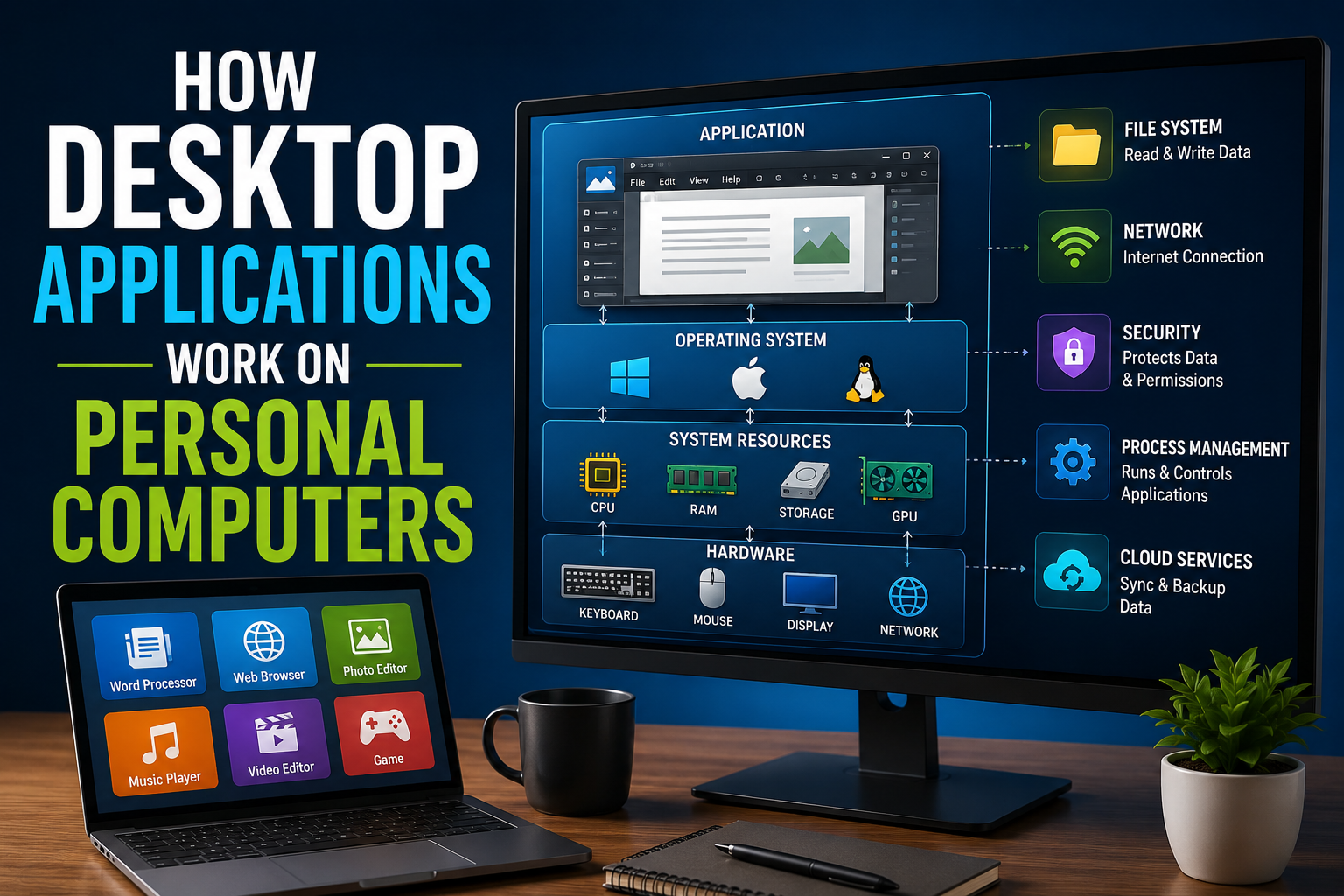
This is especially relevant to desktop applications, which may depend on particular operating-system components, drivers and hardware capabilities.
The operating system itself is the layer that coordinates many of these relationships between applications and hardware. The Complete Guide to Operating Systems explains how operating systems manage resources, hardware access and software execution.
Feature Updates Can Change the User Experience
Some updates are primarily focused on new features.
An application may gain a redesigned interface, new editing tools, improved search functions, collaboration features or integration with other services.
Feature updates can make software more useful, but they can also require users to learn new workflows.
A familiar button may move to a different location. Menus may be reorganized. A feature users relied on may be replaced or removed.
This explains why reactions to software updates can vary widely even when developers consider the new version an improvement.
The way users interact with these changing applications is also connected to User Interface Software Explained: How People Use Apps, particularly when updates redesign menus, controls and navigation.
Not Every Update Is an Upgrade for Everyone
The word “update” can create the impression that every new version is automatically better in every respect.
That is not always the case.
An update may fix one problem while creating another. It may improve security but remove support for an older device. It may add useful features while increasing resource requirements.
This is why organizations often test updates before deploying them across large numbers of computers.
Businesses may use staged deployments, allowing a small group of machines to receive an update first. If no major problems appear, the update can then be distributed more widely.
Why Updates Sometimes Cause Problems
Software updates can occasionally introduce new bugs.
This may happen because a change interacts unexpectedly with another part of the application. A developer may fix one component without realizing that another component depends on its previous behavior.
Third-party software can create additional complications.
An update to one application may conflict with an older driver, plugin or extension.
For this reason, developers often monitor software after release and may issue another update if problems are discovered.
Rollbacks Provide a Safety Net
When an update causes serious problems, developers or system administrators may provide a way to return to a previous version.
This is known as a rollback.
Rollbacks can be particularly important for businesses operating critical systems.
Instead of leaving an entire organization on a problematic version while developers investigate, administrators may temporarily restore the previous version.
However, rolling back a security update can create new risks. Organizations therefore need to consider both the original vulnerability and the problem introduced by the new version.
Why Businesses Treat Updates Differently
For an individual smartphone user, installing an update may take a few minutes.
For a large organization, updating software can be a major project.
A company may have hundreds or thousands of computers, servers and specialized applications. Some systems may be used around the clock and cannot simply be restarted whenever an update becomes available.
Businesses therefore often maintain formal patch-management processes.
These processes can involve:
-
Identifying available updates.
-
Assessing their importance and potential risks.
-
Testing them in a controlled environment.
-
Scheduling deployment.
-
Installing the update.
-
Monitoring systems afterward.
-
Rolling back or troubleshooting if problems occur.
This structured approach helps organizations balance security with operational stability.
Software Updates Also Affect Privacy
Updates can sometimes change how an application collects, stores or processes information.
A new feature may require additional permissions. Privacy settings may be reorganized. Data-processing practices may change as a service evolves.
Users should therefore pay attention to significant changes rather than automatically accepting every new permission.
For organizations, privacy-related changes may require additional review to ensure that software continues to comply with internal policies and applicable laws.
What Happens When Software Stops Receiving Updates?
Eventually, some software reaches the end of its supported life.
Developers may stop providing updates because a product is too old, a newer version has replaced it or maintaining compatibility is no longer practical.
This is known as end of support.
Using unsupported software can become increasingly risky.
New security vulnerabilities may remain unpatched. New devices may stop working correctly with it. Online services may eventually discontinue compatibility.
For that reason, end-of-support announcements are important signals that users may need to upgrade, replace or migrate to another product.
Older Devices Can Be Affected by Updates
Software updates can create difficult choices for people using older hardware.
A new operating system may require more storage, memory or processing power. Even if an older device technically supports the update, its performance may decline.
At the same time, refusing updates indefinitely can leave the device exposed to security vulnerabilities.
This creates a balancing act between security, performance, cost and device longevity.
In some cases, replacing a device is eventually necessary. In others, a lightweight software configuration or continued support for an older version may provide a reasonable alternative.
Why You Should Be Careful With Fake Updates
Software updates are also exploited by cybercriminals.
A malicious website or pop-up may falsely claim that a browser, video player or operating system needs an urgent update.
Instead of installing legitimate software, the user may unknowingly download malware.
This is why users should generally obtain updates through trusted sources, such as the operating system’s built-in update mechanism or the software developer’s official distribution channel.
Unexpected update messages that appear while browsing the web deserve particular caution.
How Users Can Manage Updates More Effectively
A few simple habits can make software maintenance easier.
Keep Critical Software Updated
Security updates for operating systems, browsers and widely used applications should generally receive priority.
Use Automatic Updates Where Appropriate
Automatic updates can reduce the risk of forgetting important security patches.
Back Up Important Data
A current backup provides protection if an update causes an unexpected problem or a device fails during the process.
Check Major Release Notes
For significant operating-system or application upgrades, reading the release notes can reveal major changes, known problems and compatibility requirements.
Update Through Trusted Channels
Use official app stores, built-in update tools or the software provider’s legitimate website rather than random pop-ups or unfamiliar download links.
Give Major Updates Time
If a computer is essential for work, consider allowing major updates to be tested or installed during a period when a temporary problem would cause minimal disruption.
Software Maintenance Never Really Ends
The modern software lifecycle is continuous.
Developers release a product, users discover problems, security researchers identify vulnerabilities, new hardware and operating systems appear, and developers respond with patches and new versions.
That cycle repeats throughout the life of the product.
This ongoing lifecycle is part of the broader software development process, which continues beyond the initial creation and release of an application.
The way software is maintained is also influenced by its licensing model. The Complete Guide to Software Licensing explains how licensing terms can affect software access, updates, maintenance and continued use.
For users, the update notification is therefore only the visible part of a much larger process involving development, testing, security research, distribution and maintenance.
Why Updates Matter More Than They Seem
Software updates may sometimes feel like interruptions, particularly when they arrive at an inconvenient moment or change a familiar interface. But they are a fundamental part of keeping modern technology functional.
They close security vulnerabilities, fix bugs, improve compatibility, introduce new capabilities and help software adapt to changing hardware and digital environments.
The most important lesson is that software is not a finished product simply because it has been installed. It is an evolving system that requires maintenance.
Keeping important software reasonably up to date, using trusted update channels and maintaining backups can help users benefit from new improvements while reducing the risks that come with outdated or unsupported technology.
For a broader understanding of how applications fit into the wider software ecosystem, see The Complete Guide to Apps.